# Leoric Documentation (Full)
> Concatenated from the guides under docs/, for AI agents to load the full context in one shot.
## Starter
### Getting Started
This guide try to illustrate the config and usage about Leoric with an abstract project about photography which is called **Portra**. Let's assume this project uses MySQL database, is based on the Egg framework, which features photo management, backup, and sharing.
#### Configuring Database
Leoric supports MySQL, SQLite, and PostgreSQL. It is able to run in both Node.js and Electron, which makes it perfectly suitable for Portra. In following configuration, we decide to put the models in `app/models` directory, with the database set to `portra`:
```js
const Realm = require('leoric');
const realm = new Realm({
host: 'localhost',
user: 'portra',
database: 'portra',
models: 'app/models',
migrations: 'database/migrations',
});
await realm.connect();
```
For detailed configuration options about different databases, please take a look about the [Setup]({{ '/zh/setup' | relative_url }}) documentation.
#### Model Basics
If the table schemas aren't managed with Leoric, we can omit the attributes definition in models and let Leoric load them from `information_schema.columns` automatically. Take `app/model/user.js` for example, it can be defined as:
```js
const { Bone } = require('leoric');
module.exports = class User extends Bone {
static initialize() {
this.hasMany('books');
this.hasMany('comments');
}
}
```
After database is connected with `await realm.connect()`, `User` model will be loaded with `User.attributes`. Then we can create, find, update, or delete records in `users` table:
```js
// create user
await User.create({ name: 'Stranger' });
// find the user just created
const user = await User.first;
assert.equal(user.name, 'Stranger');
// change the name of the user
await user.update({ name: 'Tyrael' });
// remove user
await user.remove();
```
For more information about model attributes and `information_schema.columns`, or the methods that deal with record manipulation, it is recommend to start with the [Basics]({{ '/zh/basics' | relative_url }}) introduction.
#### Creating Models with Migrations
### Migrating from Sequelize
Projects that consider migrating from Sequelize to Leoric, may try the Sequelize adapter to mitigate the migration work. With the Sequelize adapter activated, Leoric will inject an extra layer above Bone to provide compatible APIs. Please take a look about [Sequelize Adapter]({{ '/zh/sequelize' | relative_url }}) for detail.
## Basics
This guide is an introduction to Leoric. After reading this guide, you will know:
- What Object Relational Mapping (roughly) and Leoric are, and how they are used.
- How to use Leoric models to manipulate data stored in a relational database.
- Leoric schema naming conventions.
### What is Leoric
Leoric is a thin Object Relational Mapping layer between Node.js and database. It can be used as the M in [MVC](https://en.wikipedia.org/wiki/Model%E2%80%93view%E2%80%93controller) - which is the layer of the system responsible for representing business data and logic.
Object Relational Mapping, or ORM, is a way of connecting rich objects of an application to tables in a relational database management system. The idea of ORM is quite popular in a lot of the programming languages, such as Active Record for Ruby, SQLAlchemy for Python, or Hibernate for Java. Leoric is heavily influenced by [Active Record](http://guides.rubyonrails.org/active_record_basics.html) which you probably can tell already by the similar documentation structure.
As one of the many ORM libraries for JavaScript, the most promising features of Leoric shall be the abilities to:
- Represent models and their data.
- Represent associations between models.
- Map existing tables without repeating column definitions in model.
- CRUD (create, read, update, delete) in asynchronous fashion.
- Create and consume models in morden JavaScript.
### Convention over Configuration
Generally speaking, configuration is preferred over convention because of its explicitness. However, if you follow the conventions introduced by Leoric, you'll need to write few configuration when authoring models.
#### Naming Conventions
By default, Leoric uses some naming conventions to find out how the mapping between models and database tables should be created. Here're the rules:
- model names shall be in `CamelCase`, the table names will be the pluralized model name in `snake_case`,
- model attributes shall be in `camelCase`. The attribute names are fetched and transformed from the schema information, which would be in `snake_case` mostly.
Here's a few transform examples.
| Model/Class | Table/Schema |
|-------------|--------------|
| Shop | shops |
| TagMap | tagMaps |
| Mouse | mice |
| Person | people |
Under the hood, Leoric uses [pluralize](https://www.npmjs.com/package/pluralize) to transform table names from model names. If you find the transform rules counter intuitive (which is very common for non-native speakers), you can explicitly configure the table name or rename the attribute. We'll cover that in the *Overrding the Naming Conventions* section.
#### Schema Conventions
Leoric provides three static methods for relationship authoring, `.hasMany()`, `.hasOne()`, and `.belongsTo()`. The conventional primary keys and foreign keys are as below,
- **Foreign keys** should be named following the pattern `modelNameId` (e.g. `shopId`). The corresponding columns are the keys in snake case `model_name_id` (e.g. `shop_id`).
- **Primary keys** should be an unsigned integer `id`.
There're some optional column names that will add additional features to Leoric:
| column | attribute | description |
|--------------|-------------|-----------------------------------------------|
| `created_at` | `createdAt` | updated when the record is first created. |
| `updated_at` | `updatedAt` | updated whenever the record is updated. |
| `deleted_at` | `deletedAt` | updated whenever the record is softly deleted |
> For TDDL users, the conventional `gmt_create` is mapped to `createdAt`, `gmt_modified` is mapped to `updatedAt`, and `gmt_deleted` (if present) is mapped to `deletedAt`.
When `Bone.remove({...})` is called on a Model with `deletedAt` present, Leoric will perform a soft delete by updating the value of `deletedAt` column instead of delete it from the database permanently. Call `Bone.remove({...}, true)` to force delete.
### Authoring Models
Suppose the `shops` table were created already:
```sql
CREATE TABLE shops (
id int(11) NOT NULL auto_increment,
name varchar(255),
PRIMARY KEY (id)
);
```
Simply extend from the `Bone` class exported by Leoric, have it connected to database, and you're all set:
```js
const { Bone } = require('leoric');
class Shop extends Bone {}
await connect({ host: 'localhost', models: [ Shop ]});
```
It is possible to manage schema with Leoric as well. By defining attributes when authring models, Leoric learns what the model needs and will have the schema migrated when necessary:
```js
const { Bone, Realm } = require('leoric');
const { BIGINT, STRING } = Bone.DataTypes;
// define Shop
class Shop extends Bone {
static attributes = {
id: { type: BIGINT, primaryKey: true },
name: STRING,
}
}
// connecting Shop to shops table in database
const realm = new Realm({ host: 'localhost', models: [ Shop ] });
// synchronize model attributes to table
await realm.sync();
```
Now we have got the models connected to and synchronized with database, we can start querying:
```js
const shop = new Shop({ name: 'Horadric Cube' })
await shop.save()
// or simply
await Shop.create({ name: 'Horadric Cube' })
```
### Overriding the Naming Conventions
Most of the conventional names and keys can be overridden by corresponding methods. You can specify `static table` to override the default table name:
```js
class Shop extends Bone {
static table = 'stores'
}
```
It's also possible to override the the name of the primary key by specifying `static primaryKey`:
```js
class Shop extends Bone {
static primaryKey = 'shopId'
}
```
We can rename the attribute names too. By default, these names are transformed from column names by converting them into camel case. If the names don't match, we can specify the column names manually in `static attributes`, such as:
```js
class Shop extends Bone {
static attributes = {
deletedAt: { type: DATE, columnName: 'removed_at' },
}
}
```
We can also rename the attribute in the `static initialize()` method, which gets called after models are loaded.
```js
class Shop extends Bone {
static initialize() {
this.renameAttribute('removedAt', 'deletedAt')
}
}
```
A lot of schema settings can be done within the `static initialize()` method. We'll get to that later. For TypeScript projects this static method is unnecessary, most of the settings can be tweaked with the equivalent decorators. The example above can be refactored with decorator like below:
```ts
class Shop extends Bone {
@Column({ name: 'removed_at' })
deltedAt: Date;
}
```
### Connecting Models to Database
Models need to be connected to database before use, which can be connected in the following way:
```js
const Realm = require('leoric');
const realm = new Realm({
dialect: 'mysql',
host: 'localhost',
models: '/path/to/models',
});
await realm.sync();
```
`realm.sync()` not only connects models to database, but also tries to synchronize `Model.attributes` in each model back to database structure automatically to make sure consistency between each other. If your application data changes a lot, this practice is not recommended.
In that case, please use the [migrations]({{ '/migrations' | relative_url }}) to change database structure instead.
```js
const Realm = require('leoric');
const realm = new Realm(...);
await realm.connect();
```
For those who started using Leoric since v0.x, we can still `connect()` to database directly.
```js
const { connect } = require('leoric');
await connect({
host: 'example.com',
port: 3306,
user: 'john',
password: 'inputYourCodeHere',
db: 'tmall',
models: [Shop]
});
// or
await connect({ ...opts, path: '/path/to/models' });
```
If developing web applications with Egg framework, it's highly recommended using the [egg-orm](https://github.com/eggjs/egg-orm) plugin.
### Reading and Writing Data
With the models defined and connected, developers can,
- query the model with static methods such as `Model.find()` and `Model.findOne()`,
- writing data with `Model.create()` and `Model.update()`,
- removing data with `Model.remove()`, and
- persisting instance changes with `model.save()` of course.
```js
async function() {
// create shop
await Shop.create({ name: 'Barracks' })
// find one and update it
const shop = await Shop.findOne({ name: 'Barracks' })
shop.name = 'Horadric Cube'
await shop.save()
// remove the shop
await Shop.remove({ name: 'Horadric Cube' })
})
```
#### Create
There are two ways in Leoric to INSERT records into database. We can do this either by calling `Model.create()` with one blow:
```js
const shop = await Shop.create({ name: 'Barracks', credit: 10000 })
```
or by instantiating a model from scratch, settings the attributes, the `model.save()` it at last:
```js
const shop = new Shop({ name: 'Barracks' })
shop.credit = 10000
await shop.save()
```
The SQL equivalent of both is:
```sql
INSERT INTO shops (name, credit, type) VALUES ('Barracks', 10000);
```
#### Read
Although Leoric provides a rich API for starting a query, `Model.find()` and `Model.findOne()` are the most used methods.
```js
// find all of the shops
Shop.find()
// => SELECT * FROM shops;
// find the first one
Shop.findOne()
// => SELECT * FROM shops LIMIT 1;
// find the shop of Deckard Cain
Shop.findOne({ name: 'Deckard Cain' })
// => SELECT * FROM shops WHERE name = 'Deckard Cain' LIMIT 1;
// find a collection of shops with their credit above 1000
Shop.where('credit > 1000')
// => SELECT * FROM shops WHERE credit > 1000;
```
For detailed introductions about reading data from the database, please read [Query Interface]({{ '/querying' | relative_url }})
#### Update
Like the way records are created, records can be updated in two manners too. If the objects are already at hand, we can fiddle their attributes and persist the updates by calling `model.save()`:
```js
const shop = await Shop.findOne({ name: 'Barracks' })
// => Shop { id: 1, name: 'Barracks' }
shop.credit = 10000
await shop.save()
```
The SQL equivalent of the above is:
```sql
UPDATE shops SET credit = 10000 WHERE id = 1;
```
If the back and forth traffic needs to be skipped, we can also update the records with one blow using `Model.update()`:
```js
await Shop.update({ name: 'Barracks' }, { credit: 10000 })
```
The SQL equivalent of the above is:
```sql
UPDATE shops SET credit = 10000 WHERE name = 'Barracks';
```
#### Delete
Likewise, both `model.remove()` and `Model.remove()` are available to delete records from database. For example:
```js
const shop = await Shop.find({ name: 'Barracks' })
// => Shop { id: 1, name: 'Barracks' }
await shop.remove(true)
// DELETE FROM shops WHERE id = 1
await Shop.remove({ name: 'Barracks' }, true)
// DELETE FROM shops WHERE name = 'Barracks'
```
What's with the parameter `true` you might ask. That is because by default Leoric performs a soft delete instead of truly DELETE FROM the database. To make soft delete possible, the model must have a attribute called `deletedAt` to be used as a mark of deletion.
Therefore, if `deletedAt` were present in `Shop` model:
```js
const shop = await Shop.find({ name: 'Barracks' })
// => Shop { id: 1, name: 'Barracks' }
await shop.remove()
// UPDATE shops SET deleted_at = NOW() WHERE id = 1
await Shop.remove({ name: 'Barracks' })
// UPDATE shops SET deleted_at = NOW() WHERE name = 'Barracks'
```
If `deletedAt` were absent in `Shop` model, calling either `model.remove()` or `Model.remove()` without passing `true` throws an Error.
## Migrations
Developers can use migrations to manage operations that changes table schema etc.
### What Is A Migration
Take following migration for example:
```js
module.exports = {
async up(driver, DataTypes) {
const { BIGINT, STRING, TEXT } = DataTypes;
await driver.createTable('products', {
id: { type: BIGINT, primaryKey: true },
name: STRING,
description: TEXT,
});
},
async down(driver, DataTypes) {
await driver.dropTable('products');
},
}
```
By executing this migration, the `up()` part, we create a table called `products` that consists of three columns, primary key `id`, a `name VARCHAR(255)` column to store product name, and a `description TEXT` to store descriptive information of the product. A migration consists of two methods, `up()` and `down()`, which make sure the task is able to migrate or rollback.
In this migration, the rollback operation is to drop the `products` table, which makes sure the change brought by `up()` is correctly reverted in `down()`.
Migrations can not only be used to change schema, but also can be used to migrate existing data. For example if we're trying to add a new column which has default value different than existing data, we can do it like below:
```js
module.exports = {
async up(driver, DataTypes) {
await driver.addColumn('users', {
wants_marketing_email: { type: BOOLEAN, default: false },
});
await driver.query('UPDATE users SET wants_marketing_email = 1');
},
async down(driver, DataTypes) {
await driver.removeColumn('users', 'wants_marketing_email');
},
}
```
The migration above adds a new column called `users.wants_marketing_email` which defaults to `false`, but we want existing users remain subscribed to our marketing emails.
#### Creating Migration File
We can use `Realm#createMigrationFile(name)` to create migration file:
```js
const Realm = require('leoric');
const realm = new Realm({
client: 'mysql',
migrations: 'database/migrations',
});
await realm.createMigrationFile('create-products');
// which creates migration file like 20210621170235-create-products.js in database/migrations
```
The generated migration file looks like below:
```js
'use strict';
module.exports = {
async up(driver, DataTypes) {
// TODO
},
async down(driver, DataTypes) {
// TODO
}
};
```
#### Naming Conventions
As described above, `realm.createMigrationFile(name)` creates migration file like `20210621170235-create-products.js`. The prefix is the timestamp of the file when it's created, which is formatted as `YYYYMMDDHHMMSS`. The rest part of the file name is the `name` passed to the method. Therefore the full format of the migration file is `YYYYMMDDHHMMSS-${name}`.
Migrations that are executed will be stored in `leoric_meta` table to track the progress. If the table `leoric_meta` does not exist when migrating, it will be created automatically.
If the migration is reverted with `realm.rollback()`, the corresponding record will be removed from `leoric_meta`.
#### Changing Migration
We'd recommend not to change migration back and forth, especially if the migration were committed into version control system, which might have its older version executed in other developer's database. In that case, it is highly unlikely to make it right for everyone involed.
Creating new migration to correct previous mistakes is recommended.
#### Data Types Supported
Following data types are supported:
```js
STRING
INTEGER
BIGINT
DATE
BOOLEAN
TEXT
BLOB
JSON
JSONB
```
These data types will be mapped to corresponding type in database. For example, in MySQL `STRING` is mapped to `VARCHAR(255)`.
### Writing a Migration
#### Creating a Table
```js
module.exports = {
async up(driver, DataTypes) {
const { STRING, BIGINT, INTEGER } = DataTypes;
await driver.createTable('products', {
id: { type: BIGINT, primary: true },
category_id: { type: BIGINT },
name: STRING,
price: INTEGER,
});
},
};
```
The code above is equivalent to the SQL below:
```sql
CREATE TABLE `products` (
`id` BIGINT PRIMARY KEY,
`category_id` BIGINT,
`name` VARCHAR(255),
`price` INT,
);
```
#### Adding Columns
```js
module.exports = {
async up(driver, DataTypes) {
await driver.addColumn('products', 'volume', {
type: DataTypes.INTEGER,
defaultValue: 0,
});
},
}
```
The code above is equivalent to the SQL below:
```sql
ALTER TABLE `products` ADD COLUMN `volume` INTEGER;
```
#### Changing Columns
```js
module.exports = {
async up(driver, DataTypes) {
await driver.changeColumn('products', 'volume', {
type: DataTypes.INTEGER.UNSIGNED,
defaultValue: 0,
});
},
}
```
The code above is equivalent to the SQL below:
```sql
ALTER TABLE `products` ADD COLUMN `volume` INTEGER UNSIGNED;
```
#### Renaming Column
```js
module.exports = {
async up(driver, DataTypes) {
await driver.renameColumn('products', 'volume', 'stock');
},
};
```
The code above is equivalent to the SQL below (which is not quite the same in older versions of MySQL):
```sql
ALTER TABLE `products` RENAME COLUMN `volume` TO `stock`;
```
#### Removing Columns
|---|-------------------------|
| ⚠️ | PLEASE BACK UP AT FIRST |
```js
module.exports = {
async up(driver, DataTypes) {
await driver.removeColumn('products', 'stock');
},
};
```
The code above is equivalent to the SQL below:
```sql
ALTER TABLE `products` DROP COLUMN `stock`;
```
#### Creating Indices
```js
module.exports = {
async up(driver, DataTypes) {
await driver.addIndex('products', [ 'category_id', 'price' ]);
},
};
```
The code above is equivalent to the SQL below:
```sql
CREATE INDEX `idx_products_category_id_price` ON `products` (`category_id`, `price`);
```
#### Removing Indices
```js
module.exports = {
async up(driver, DataTypes) {
await driver.removeIndex('products', [ 'category_id', 'price' ]);
},
};
```
The code above is equivalent to the SQL below:
```sql
DROP INDEX `idx_products_category_id_price`;
```
#### Truncating Tables
|---|-------------------------|
| ⚠️ | PLEASE BACK UP AT FIRST |
```js
module.exports = {
async up(driver, DataTypes) {
await driver.truncateTable('products');
}
};
```
The code above is equivalent to the SQL below:
```sql
TRUNCATE TABLE `products`;
```
#### Dropping Tables
|---|-------------------------|
| ⚠️ | PLEASE BACK UP AT FIRST |
```js
module.exports = {
async down(driver, DataTypes) {
await driver.dropTable('products');
},
};
```
The code above is equivalent to the SQL below:
```sql
DROP TABLE `table_name`;
```
#### Using the `up`/`down` Methods
Migrations should provide both `up` and `down` methods. The former one is used to perform the intended change to schema, and the latter one is used to revert the change brought by `up`. The default content of the newly created migration is like below:
```js
'use strict';
module.exports = {
async up(driver, DataTypes) {
},
async down(driver, DataTypes) {
},
};
```
It is strongly recommended that make sure the changes will be properly reverted in `down`, nothing that might interfere other migrations, such as redundant columns or tables, should be left behind.
### Running Migrations
```js
const Realm = require('leoric');
const realm = new Realm();
await realm.migrate();
```
All of the migrations that are not executed yet will be loaded and executed accordingly. For example, if we have following migrations to execute:
```
// database/migrations
20210622130000-create-products.js
20210623150000-add-product-price.js
20210623160000-create-recipients.js
```
Then when we call `realm.migrate()`, the `up()` methods in `create-products`, `add-product-price`, and `create-recipients` get called one after another.
The name of the performed migrations are stored in `leoric_meta`:
```bash
mysql> select * from leoric_meta;
+------------------------------------------------------------------------+
| name |
+------------------------------------------------------------------------+
| 20210622130000-create-products.js |
| 20210623150000-add-product-price.js |
| 20210623160000-create-recipients.js |
+------------------------------------------------------------------------+
```
#### Rolling Back
```js
const Realm = require('leoric');
const realm = new Realm();
// one step backward
await realm.rollback()
// three steps backward
await realm.rollback(3);
```
`realm.rollback()` will query executed migrations from `leoric_meta`, and then execute the `down()` method accordingly.
#### Resetting the Database
To reset the database, rollback all executed migrations and then re-run them from scratch. Currently Leoric does not provide a dedicated `reset()` method, but this can be achieved by combining `rollback()` and `migrate()`:
```js
const Realm = require('leoric');
const realm = new Realm({
client: 'mysql',
migrations: 'database/migrations',
});
// rollback all migrations (use a large number to cover all)
await realm.rollback(Infinity);
// re-run all migrations
await realm.migrate();
```
> **Warning**: This will destroy all existing data. Always back up your database before resetting.
#### Running Specific Migration
You can control how many pending migrations to run by passing a `steps` parameter to `realm.migrate()`:
```js
// run only the next pending migration
await realm.migrate(1);
// run the next 3 pending migrations
await realm.migrate(3);
```
Similarly, `realm.rollback()` accepts a step count:
```js
// rollback the last migration
await realm.rollback();
// rollback the last 3 migrations
await realm.rollback(3);
```
> **Note**: There is currently no built-in way to run a specific migration by name. Migrations are always executed in chronological order based on their filename timestamps.
### Using Models in Migrations
In some cases, you may need to use models within migrations to manipulate data. To do this, require the model and use raw queries or model methods. Keep in mind that the model must already be connected:
```js
module.exports = {
async up(driver, DataTypes) {
// Add the new column first
await driver.addColumn('users', 'display_name', {
type: DataTypes.STRING,
});
// Use raw SQL to populate the new column from existing data
await driver.query(`
UPDATE users SET display_name = CONCAT(first_name, ' ', last_name)
`);
},
async down(driver, DataTypes) {
await driver.removeColumn('users', 'display_name');
},
};
```
If you need to use the model API instead of raw SQL, you can set up a Realm instance within the migration. However, this is generally discouraged because model definitions may change over time and become out of sync with the migration:
```js
const Realm = require('leoric');
const User = require('../../app/models/user');
module.exports = {
async up(driver, DataTypes) {
await driver.addColumn('users', 'display_name', {
type: DataTypes.STRING,
});
// Use model API (ensure connect is called)
const realm = new Realm({
client: 'mysql',
database: 'myapp',
models: [User],
});
await realm.connect();
const users = await User.find();
for (const user of users) {
await user.update({ displayName: `${user.firstName} ${user.lastName}` });
}
await realm.disconnect();
},
async down(driver, DataTypes) {
await driver.removeColumn('users', 'display_name');
},
};
```
> **Best practice**: Prefer raw SQL queries (`driver.query()`) over model APIs in migrations. Raw SQL is deterministic and won't break if the model definition changes later.
### Schema Dumping
|---|---------------------------|
| ⚠️ | NOT FULLY IMPLEMENTED YET |
When migration finishes executing, not matter `realm.migrate()` or `realm.rollback()`, Leoric will create a schema dump in the parent directory of `opts.migrations`. For example, if the path specified with `opts.migrations` is `database/migrations`, the file will be created at `database/schema.js`, which contains statements like below:
```js
module.exports = async function createSchema(driver, DataTypes) {
const { STRING, INTEGER, BIGINT, DATE } = DataTypes;
await driver.dropTable('products');
await driver.createTable('products', {
id: { type: BIGINT, primaryKey: true },
name: STRING,
price: INTEGER,
createdAt: DATE,
updatedAt: DATE,
});
// other tables
}
```
The schema dump contains only statements about the table structures. The data stored in those tables is not included.
## Validations
This article will introduce how to use leoric to constrain model's attributes and validate its' values.
### allowNull
The attribute definition of the model can set whether the attribute can be `null` or not. When the model is synchronized, the corresponding table's field attribute characteristics (`NOT NULL` or `NULL`) will be generated according to the value of `allowNull`. When the model instance attribute value does not match the setting, an error will be thrown.
```javascript
const { Bone, DataTypes } = require('leoric');
class User extends Bone {
static attributes = {
id: { type: DataTypes.BIGINT, primaryKey: true },
email: { type: DataTypes.STRING, allowNull: false },
...
}
};
User.sync();
/*
CREATE TABLE `users` (
`id` bigint(20) AUTO_INCREMENT PRIMARY KEY,
`email` varchar(256) NOT NULL,
....
);
*/
User.create({ name: 'OldHunter' }); // throw LeoricValidateError('notNull'); email should not be null
```
### unique
You can set a unique constraint on a field using 'unique':
```javascript
const { Bone, DataTypes } = require('leoric');
class User extends Bone {
static attributes = {
id: { type: DataTypes.BIGINT, primaryKey: true },
email: { type: DataTypes.STRING, allowNull: false, unique: true },
...
}
};
User.sync();
/*
CREATE TABLE `users` (
`id` bigint(20) AUTO_INCREMENT PRIMARY KEY,
`email` varchar(256) NOT NULL UNIQUE,
....
);
*/
```
### Built-in validator
In addition to validators included in [validator.js](https://github.com/validatorjs/validator.js) as built-in validators, leoric also provides the following built-in validators:
```javascript
class User extends Bone {
static attributes = {
var: {
type: ANYTYPE,
validate: {
notIn: [['MHW', 'Bloodborne']], // Not one of them
notNull: true, // Can't be NULL
isNull: true, // Must be NULL
min: 1988, // MinValue
max: 2077, // MaxValue
contains: 'Handsome', // Must contains 'Handsome'
notContains: 'Handsome', // Mustn't contain 'Handsome'
regex: /^iceborne/g, // Matching RegExp
notRegex: /^iceborne/g, // Not matching RegExp
is: /^iceborne/g, // Matching RegExp
notEmpty: true, // not allow empty string
}
}
}
}
```
#### Custom error message
The built-in validator supports customize error messages instead of the default error messages of leoric.
```javascript
class User extends Bone {
static attributes = {
var: {
type: ANYTYPE,
validate: {
isIn: {
args: [ 'MHW', 'Bloodborne' ], // 'args' are the arguments of validator
msg: 'OH! WHAT HAVE YOU DONE?!' // `msg` is custom error message
},
notNull: {
args: true,
msg: 'OH! WHAT HAVE YOU DONE?!'
}
}
}
}
}
```
### Custom validators
leoric supports set custom validators. You can throw an error or return `false` from the validator while the validation fails, and Leoric will take the next step based on the returns.
```javascript
class User extends Bone {
static attributes = {
desc: {
type: DataTypes.STRING,
validate: {
isValid() {
if (this.desc && this.desc.length < 2) { // you can access attribute's value by this
throw new Error('Invalid desc');
}
},
lengthMax(value) { // the first argument is the value of attribute
if (value && value.length >= 10) {
return false;
}
}
}
}
}
}
```
## Associations
This guide covers the association features of Leoric. After reading this guide, you will know:
- How to declare assocations between models.
- How to understand the various types of associations.
### Why Associations
With associations well defined, developers can pull structured data with a single query such as:
```js
const shop = await Shop.findOne({ id }).with('items', 'owner')
// => Shop { id: 1,
// name: 'Barracks',
// items: [ Item { name: "Wirt's Leg" }, ... ],
// owner: User { name: 'Tyreal' } }
```
### Types of Associations
Leoric supports four types of associations:
- `belongsTo()`
- `hasMany()`
- `hasMany({ through })`
- `hasOne()`
Associations can be declared within the `Model.describe()` method. For example, by declaring a shop `belongsTo()` its owner, you're telling Leoric that when `Shop.find().with('owner')`, Leoric should join the table of owners, load the data, and instantiate `shop.owner` on the found objects.
There are four equivalent decorators for projects written in TypeScript
- `@BelongsTo()`
- `@HasMany()`
- `@HasMany({ through })`
- `@HasOne()`
The major difference between static method and decorators for associations is that the first parameter can be omitted in the decorator equivalent. For example, `Post.belongsTo('user')` declared with decorator is like below:
```ts
class Post {
@BelongsTo()
user: User
}
```
#### `belongsTo()`
A `belongsTo()` association sets up a one-to-one or many-to-one relationship. For example, a shop can have many items as it finds fit. On the other hand, an item can `belongsTo()` to exactly one shop. We can declare the `Item` this way:
```js
class Item extends Bone {
static initialize() {
this.belongsTo('shop')
}
}
```
The TypeScript equivalent with decorator is like below:
```ts
class Item extends Bone {
@BelongsTo()
shop: Shop;
}
```
Leoric locates the model class `Shop` automatically by capitalizing `shop` as the model name. If that's not the case, we can specify the model name explicitly by passing `className`:
```js
class Item extends Bone {
static initialize() {
this.belongsTo('shop', { className: 'Seller' })
}
}
```
The TypeScript equivalent with decorator is like below:
```ts
class Item extends Bone {
@BelongsTo({ className: 'Seller' })
shop: Shop;
}
```
> Please be noted that the value passed to `className` is a string rather than the actual model class. Tossing the actual classes back and forth between the two parties of an association at `Model.describe()` phase can be error prone because it causes cyclic dependencies.
As you can tell from the ER diagram, the foreign key used to associate a `belongsTo()` relationship is located on the model that initiates it. The name of the foreign key is found by uncapitalizing the target model's name and then appending an `Id`. In this case, the foerign key is converted from `Shop` to `shopId`.
> Leoric has two sets of names maintained under the hood. One is the attribute names of the model, which usually are in camel case to be compliant with common JavaScript coding conventions. The other is the columns names of the actual table, which may be in camel case but usually are in snake case.
To override foreign key, we can specify it explicitly:
```js
class Item extends Bone {
static initialize() {
this.belongsTo('shop', { foreignKey: 'sellerId' })
}
}
```
The TypeScript equivalent with decorator is like below:
```ts
class Item extends Bone {
@BelongsTo({ foreignKey: 'sellerId' })
shop: Shop;
}
```
#### `hasMany()`
If you look this ER diagram from the shops point of view, you may notice that there is a `hasMany()` association too. The shop `hasMany()` items:
```js
class Shop extends Bone {
static initialize() {
this.hasMany('items')
}
}
```
The TypeScript equivalent with decorator is like below:
```ts
class Shop extends Bone {
@HasMany()
items: Item[];
}
```
> Please be noted that unlike `belongsTo()`, the name passed to `hasMany()` is usually in plural.
The way Leoric locates the actual model class is quite similar. It starts with singularizing the name, then capitalizing. In this case, `items` get singularized to `item`, and then `Item` is used to look for the actual model class.
To override the model name, we can specify it explicitly:
```js
class Shop extends Bone {
static initialize() {
this.hasMany('items', { className: 'Commodity' })
}
}
```
The TypeScript equivalent with decorator is like below:
```ts
class Shop extends Bone {
// It might be able to deduce the className from `Commodify[]` type
@HasMany({ className: 'Commodity' })
items: Commodity[];
}
```
As you can tell from the ER diagram, the foreign key used to join two tables is located at the target table, `items`. To override the foreign key, just pass it to the option of `hasMany()`:
```js
class Shop extends Bone {
static initialize() {
this.hasMany('items', { foreignKey: 'sellerId' })
}
}
```
The TypeScript equivalent with decorator is like below:
```ts
class Shop extends Bone {
@HasMany({ foreignKey: 'sellerId' })
items: Item[];
}
```
#### `hasMany({ through })`
The world of entity relationships doesn't consist of one-to-one or one-to-many associations only. There are many scenarios that require a many-to-many association to be setup. However, in relational databases many-to-many between two tables isn't possible by nature. To accompish this, we need to introduce an intermediate table to bridge the associations.
Take following tag system for example:
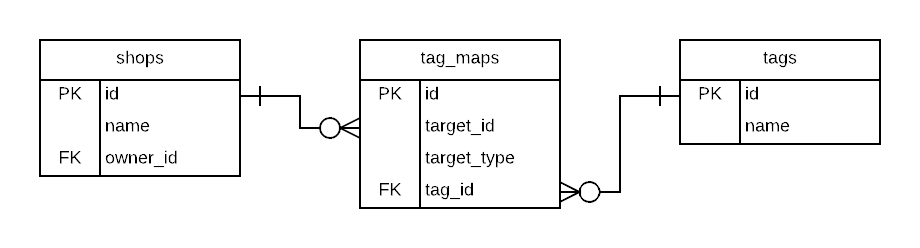
A shop can have as many tags as it see fit. And a tag can be related to as many shops as it like. The actual relationships are recorded in the `tag_maps` table. To find associations either from the shop or the tag, the query needs to go through `tag_maps` first.
> As you may have noticed already, the `tag_maps` doesn't necessarily relate to `shops` as their targets in this ER model. It supports generic targets with the `target_type` column. In this way, the `tags` can have many-to-many associations to any other models.
`hasMany({ through })` is just the method that helps us setup that kind of associations. From `Shop`'s point of view:
```js
class Shop extends Bone {
static initialize() {
// the extra where is needed if you fancy this generic tag system
this.hasMany('tagMaps', { foreignKey: 'targetId', where: { targetType: 0 } })
this.hasMany('tags', { through: 'tagMaps' })
}
}
```
The TypeScript equivalent with decorator is like below:
```ts
class Shop extends Bone {
@HasMany({ foreignKey: 'targetId', where: { targetType: 0 } })
tagMaps: TagMap[];
@HasMany({ through: 'tagMaps' })
tags: Tag[];
}
```
On `Tag`'s side:
```js
class Tag extends Bone {
static initialize() {
this.hasMany('shopTagMaps', { className: 'TagMap', where: { targetType: 0 } })
this.hasMany('shops', { through: 'shopTagMaps' })
}
}
```
The TypeScript equivalent with decorator is like below:
```ts
class Shop extends Bone {
@HasMany({ className: 'TagMap', foreignKey: 'targetId', where: { targetType: 0 } })
shopTagMaps: TagMap[];
@HasMany({ through: 'shopTagMaps' })
shops: Tag[];
}
```
If suddenly our business requires us to apply the tag system to items too, the changes needed on `Tag` model is trivial:
```diff
class Tag extends Bone {
static initialize() {
this.hasMany('shopTagMaps', { className: 'TagMap', where: { targetType: 0 } })
this.hasMany('shops', { through: 'shopTagMaps' })
+ this.hasMany('itemTagMaps', { className: 'TagMap', where: { targetType: 1 } })
+ this.hasMany('items', { through: 'itemTagMaps' })
}
}
```
#### `hasOne()`
A `hasOne()` association also sets up a one-to-one connection with another model, but with a few sematic differences. At first glance it may look quite similar to `belongsTo()` or even `hasMany()`.
The difference between `hasOne()` and `belongsTo()` is mainly at the position of the foreign key. `hasOne()`, like `hasMany()`, needs the foreign key to be added in the target model, while `belongsTo()` needs the it located in the initiating model.
The difference between `hasOne()` and `hasMany()` is subtle. When a model `hasOne()` of another model, the other model will be mounted as a singleton. When it `hasMany()` of another model, the mounted attribute will be a collection that contains all the target models instead.
In this example, a user has one shop:
```js
class User extends Bone {
static initialize() {
this.hasOne('shop', { foreignKey: 'ownerId' })
}
}
```
The TypeScript equivalent with decorator is like below:
```ts
class User extends Bone {
@HasOne({ foreignKey: 'ownerId' })
shop: Shop;
}
```
And the shop belongs to the user:
```js
class Shop extends Bone {
static initialize() {
this.belongsTo('owner', { className: 'User' })
}
}
```
The TypeScript equivalent with decorator is like below:
```ts
class Shop extends Bone {
@BelongsTo({ className: 'User' })
owner: User;
}
```
#### Choosing Between `belongsTo()` and `hasOne()`
As dicussed in the `hasOne()` section, the difference between `belongsTo()` and `hasOne()` is mostly at where to place the foreign key. The corresponding model of the table that contains the foreign key should be the one that declares the `belongsTo()` association.
For example, it makes perfect sense that a user should `hasOne()` shop, and the shop should `belongsTo()` an owner (which is a special type of user). Then the shops table should declare the foreign column called `owner_id` to make `this.hasOne('shop', { foreignKey: 'ownerId' })` work.
There's a bonus of reasoning this kind of differences between associations. If the business needs to allow a user to have multiple shops someday, we can just change the `hasOne()` to `hasMany()`, wrap existing code into a `for (const shop of user.shops)` loop, and then go get a coffee. There's no need to touch code at the `Shop` model.
## Query Interface
This guide covers different ways to retrieve data from the database using Leoric. After reading this guide, you will know:
- How to filter records using a variety of methods and conditions.
- How to specify the order, retrieved attributes, grouping, and other properties of the found records.
- How to use `.include()` to reduce the number of database queries needed for data retrieval.
### Retrieving Objects from the Database
Leoric provides two major ways to start a query, `.find()` and `.findOne()`. `.findOne()` is basically the same as `.find()`, except that it returns only one record or null if no record were found.
#### Retrieving a Single Object
##### `.findOne()`
```js
const post = await Post.findOne(1)
// => Post { id: 1, ... }
```
The SQL equivalent of the above is:
```sql
SELECT * FROM posts WHERE id = 1 LIMIT 1;
```
`.findOne()` is like a stingy twin of `.find()` because it works exactly like `.find()` except that it will always append a `.limit(1)` to it. Hence complex query is possible with `.findOne()` too:
```js
const post = await Post.findOne({
title: ['New Post', 'Untitled'],
createdAt: new Date(2012, 4, 15)
})
// => Post { id: 1, title: 'New Post', ... }
```
The SQL equivalent of the above is:
```sql
SELECT * FROM posts WHERE title IN ('New Post', 'Untitled') AND created_at = '2012-04-15 00:00:00' LIMIT 1;
```
If no record is found, `.findOne()` will return `null` whereas `.find()` will return an empty collection.
##### `.first`
The `.first` getter finds the first record ordered by primary key. For example:
```js
const post = await Post.first
// => Post { id: 1, ... }
```
The SQL equivalent of the above is:
```sql
SELECT * FROM posts ORDER BY id LIMIT 1;
```
##### `.last`
The `.last` getter finds the last record ordered by primary key. For example:
```js
const post = await Post.last
// => Post { id: 42, ... }
```
The SQL equivalent of the above is:
```sql
SELECT * FROM posts ORDER BY id DESC LIMIT 1;
```
#### Retrieving Multiple Objects
To retrieve multiple objects, just change from `.findOne()` to `.find()`. It takes the same parameters as `.findOne` but will always return a collection. If no records were found, the collection will be empty. For example:
```js
const posts = await Post.find({ id: [1, 10] })
// => Collection [ Post { id: 1, ... },
// Post { id: 10, ... } ]
```
The SQL equivalent of the above is:
```sql
SELECT * FROM posts WHERE id in (1, 10);
```
#### Retrieving Multiple Objects in Batches
When we need to iterate over a large collection, the solution might seems straightforward:
```js
const posts = await Post.all
for (const post of posts) {
// handle post
}
```
But if the posts table is at large size, this approach becomes slow and memory consuming, hence impractical. There are many ways to circumvent situations like this, such as refactor the implementation into smaller operations without loading all rows at once and so on. Switch to find in batch is the most convenient one:
```js
for await (const post of Post.all.batch()) {
// handle post
}
```
The SQL equivalent of the above is:
```sql
-- assume posts contains 2000 rows, the default LIMIT is 1000
SELECT * FROM posts LIMIT 1000;
SELECT * FROM posts LIMIT 1000 OFFSET 1000;
SELECT * FROM posts LIMIT 1000 OFFSET 2000;
```
To set batch size, we can pass a number to `.batch()`:
```js
// This queries database with LIMIT 100
for await (const post of Post.all.batch(100)) {
// handle post
}
```
### Conditions
Both `.find()` and `.findOne()` allow you to specify conditions to filter records stored in database. Conditions can either be specified as:
- pure string,
- template string with arguments, or
- object.
For brevity and security concerns, we'd recommend using template string conditions.
#### Pure String Conditions
Pure string conditions is quite handy if you need to query with literal values:
```js
Post.find('title != "New Post"')
// => SELECT * FROM posts WHERE title != 'New Post';
```
But it can be dangerous too, if it is in clumsy hands:
```js
Post.find(`title != ${title}`)
// let title be "'' or 1 = 1"
// => SELECT * FROM posts WHERE title != '' OR 1 = 1;
```
To prevent this SQL injection prone usage, Leoric will throw an error if complex values were found while parsing string conditions. The allowed values are:
- numbers
- strings with single/double quotations (e.g. `'foo'`, `"bar"`)
- `true`/`false`
- `null`/`undefined`
For other type of values, consider object conditions or templated string conditions.
#### Object Conditions
Object conditions may sound familiar because it's a common approach of condition mapping in JavaScript, let alone in NoSQL databases like MongoDB. With object conditions, most of the simple conditions can be carried out by listing fields as keys and values as, well, values. The values can be extended as objects with `$operator`s as key, hence make comparison conditions possible as well. Here are a few examples of object conditions with primitive values:
```js
Post.find({ id: 1 })
// => SELECT * FROM posts WHERE id = 1;
Post.find({ title: 'New Post' })
// => SELECT * FROM posts WHERE title = 'New Post';
Post.find({ title: undefined })
Post.find({ title: null })
// => SELECT * FROM posts WHERE title IS NULL;
```
and with values of array or other non-primitive types:
```js
Post.find({ title: ['New Post', 'Untitled'] })
// => SELECT * FROM posts WHERE title IN ('New Post', 'Untitled');
Post.find({
title: { toSqlString: () => "'New Post'" }
})
// toSqlString() will be called when it comes to objects with toSqlString() method.
// => SELECT * FROM posts WHERE title = 'New Post';
```
#### Object Conditions with Operators
As you may have noticed in the previous example, the values in object conditions can be objects as well. If every property of the object is one of `($eq, $gt, $gte, $lt, $lte, $ne, $in, $nin, $notIn, $like, $notLike, $between, $notBetween)`, the object is considered operator object condition:
```js
Post.find({ title: { $ne: 'New Post' } })
// => SELECT * FROM posts WHERE title != 'New Post';
Post.find({ title: { $like: '%Post%' } })
// => SELECT * FROM posts WHERE title LIKE '%Post%';
Post.find({ createdAt: { $lt: new Date(2017, 10, 11) } })
// => SELECT * FROM posts WHERE gmt_create < '2017-11-11 00:00:00';
Post.find({ createdAt: { $notBetween: [new Date(2017, 10, 11), new Date(2017, 11, 12)] } })
// => SELECT * FROM posts WHERE gmt_create NOT BETWEEN '2017-11-11 00:00:00' AND '2017-12-12 00:00:00';
```
If the object has multiple operators, the condition is combined with `AND`:
```js
Post.find({ id: { $gt: 0, $lt: 999999 }})
// => SELECT * FROM posts WHERE id >= 0 AND id <= 999999
```
Currently no logical operators (such as `AND`, `OR`, and `!`) is supported via operator object condition. Consider using string conditions instead.
#### Templated String Conditions
Templated string conditions usually are the better option against object conditions when it comes to multiple conditions or comparison conditions for its brevity. The example of object conditions above can be written in templated string conditions as this:
```js
Post.find('title != ?', 'New Post')
// => SELECT * FROM posts WHERE title != 'New Post';
Post.find('title like ?', '%Post%')
// => SELECT * FROM posts WHERE title LIKE '%Post%';
Post.find('createdAt < ?', new Date(2017, 10, 11))
// => SELECT * FROM posts WHERE gmt_create < '2017-11-11 00:00:00'
Post.find('createdAt < ? or createdAt > ?', new Date(2017, 10, 11), new Date(2017, 11, 12))
// => SELECT * FROM posts WHERE gmt_create < '2017-11-11 00:00:00'
```
Templated string conditions works with special primitive values or non-primitive values too:
```js
Post.find('title = ?', null)
Post.find('title = ?', undefined)
// => SELECT * FROM posts WHERE title IS NULL;
Post.find('title = ?', ['New Post', 'Untitled'])
// => SELECT * FROM posts WHERE title in ('New Post', 'Untitled');
```
When it comes to combining multiple conditions, templated string conditions is at its best advantage:
```js
Post.find('title != ? and createdAt > ?', 'New Post', new Date(2017, 10, 11))
// => SELECT * FROM posts WHERE title != 'New Post' AND gmt_create > '2017-10-11';
```
### Ordering
To retrieve the records from the database in specific order, you can use the order method.
For example, to retrieve posts updated most recently, we can order the posts by `updatedAt` in descending order:
```js
Post.order('updatedAt', 'desc')
```
`.order()` also accepts parameters in following types:
```js
Post.order('updatedAt desc')
Post.order({ updatedAt: 'desc' })
```
The SQL equivalent of the above is:
```sql
SELECT * FROM posts ORDER BY updated_at DESC;
```
The order is default to `asc`. Hence `Post.order('updatedAt')` is the same as `Post.order('updatedAt asc')`.
To order by multiple columns:
```js
Post.order({ updatedAt: 'desc', title: 'asc' })
// or
Post.order('updatedAt desc').order('title')
```
Both are equivalent to the following SQL:
```sql
SELECT * FROM posts ORDER BY updated_at DESC, title ASC;
```
### Selecting Specific Fields
By default, `.find()` selects all the fields from the result set using `*`. To select a subset of fields from the result set, you can specify the subset with the `.select()` method:
```js
Post.select('id', 'title', 'createdAt')
// or
Post.select('id, title, createdAt')
```
The SQL equivalent of the above is:
```sql
SELECT id, title, created_at FROM posts;
```
### Limit and Offset
It is always recommended to limit the query, unless the query result is unlikely to be bloated. One of the scenarios where limit and offset are used most often, is pagination. For example, to get the top 20 posts updated most recently:
```js
const posts = await Post.order('updatedAt desc').limit(20)
```
To get the second 20 posts updated most recent, e.g. user turned to page 2 and the page size is 20:
```js
const posts = await Post.order('updatedAt desc').limit(20).offset(20)
```
The SQL equivalent of the above is:
```sql
SELECT * FROM posts ORDER BY updated_at DESC LIMIT 20 OFFSET 20;
```
### Group
`GROUP BY` is one of most important features of relational database. Combined with calculation functions such as `COUNT()` and `SUM()`, it is a convenient way of accumulating meaningful data from records.
For example, if you want to find out at which date most posts where published:
```js
Post.group('DATE(createdAt)').count().order('count desc')
```
The SQL equivalent of the above is:
```sql
SELECT COUNT(*) as count, DATE(created_at) FROM posts GROUP BY DATE(created_at) ORDER BY count DESC;
```
When the query is grouped, it returns vanilla query results of the database instead of dispatching the results to the corresponding models because there's none. The example above might return:
```js
[ { count: 1, 'DATE(created_at)': '2017-12-12' },
{ count: 5, 'DATE(created_at)': '2017-11-11' },
... ]
```
It is still possible to join other models to the query though, we'll discuss that in the *Joining Tables* section.
### Having
`HAVING` is only necessary when you need to filter the results by calculated columns. It is recommended to put the conditions into `WHERE` as much as possible and leave only the calculated ones to `HAVING` because in this way the temporary data set would be smaller.
Take the group example above for another example, we can rule out dates that has the count of posts published less than 5.
```js
Post.group('DATE(createdAt)').count().order('count desc').having('count < 5')
```
The SQL equivalent of the above is:
```sql
SELECT COUNT(*) as count, DATE(created_at) FROM posts GROUP BY DATE(created_at) HAVING count < 5 ORDER BY count DESC;
```
And the results might be:
```js
[ { count: 4, 'DATE(created_at)': '2017-11-11' },
... ]
```
### Transactions
> The transaction ability is a bit premature currently due to the lack of `LOCK`. Hopefully we'll see to it soon.
We can use `Model.transaction()` to obtain a connection from the connection pool, and wrap the queries between `BEGIN` and `COMMIT`/`ROLLBACK` through the obtained connection. `Model.transaction()` takes either `AsyncFunction` or `GeneratorFunction` as argument. Take following transaction for example:
```js
Post.transaction(async function({ connection }) {
await Comment.create({ content: 'tl;dr', articleId: 1 }, { connection });
await Post.findOne({ id: 1 }).increment('commentCount', { connection });
});
```
the equivalent generator function version is like below:
```js
Post.transaction(function* () {
yield Comment.create({ content: 'tl;dr', articleId: 1 });
yield Post.findOne({ id: 1 }).increment('commentCount');
});
// => Promise
```
The SQL equivalent of the above is:
```sql
BEGIN
INSERT INTO comments (content, article_id) VALUES ('tl;dr', 1);
UPDATE posts SET comment_count = comment_count + 1 WHERE id = 1;
COMMIT
```
If there were any exceptions thrown during iteration, `Model.transaction()` forwards the exception after executing `ROLLBACK`.
The use of `function* () {}` might be a bit absurd at first glance. Behind the curtain,
1. A connection is obtained from the pool before the generator function is called.
2. `BEGIN`
3. Call `generator.next()` to push the iterator forward.
4. If `generator.next()` returns an instance of `Spell`, the obtained connection is set to `spell.connection`.
5. Spell performs the query through given connection.
6. Continue the iteration until the very end.
7. `COMMIT`
In this way we make sure all the related SQLs are queried through the same connection.
### Joining Tables
Leoric provides two ways of constructing JOIN querys:
- Join predefined associations using `.with(relationName)`,
- Join arbitrary models using `.join(Model, onConditions)`.
#### Predefined Joins
Predefined associations can be found by examining `Model.relations`, which is generated by calling `Model.describe()` implicitly. We can define associations by arranging `.hasMany()`, `.hasOne()`, and `.belongsTo()` in `Model.describe()` such as:
```js
class Post extends Bone {
static initialize() {
this.hasMany('comments')
this.belongsTo('author', { foreignKey: 'authorId', Model: 'User' })
}
}
```
To find with predefined joins, we call `.include(name)`:
```js
Post.include('comments')
// or
Post.find().with('comments')
```
The SQL equivalent of the above is:
```sql
SELECT * FROM posts LEFT JOIN comments ON posts.id = comments.post_id;
```
A LEFT JOIN is performed to preserve posts that have got no comments. The ON conditional expression is generated according to the type and the settings of the association. See [Associations]({{ '/associations' | relative_url }}) for detailed informations.
To find multiple predefined joins, we can either pass multiple association names to `.include()` or chain them one by one using `.with()`:
```js
Post.include('comments', 'author')
// or
Post.find().with('comments').with('author')
```
Please be noted that the chaining order of `.with()` matters, queries like below are not equivalent:
```js
Post.findOne().with('comments')
// NOT EQUALS TO
Post.find().with('comments').first
```
By type definitions, both queries will return a Post instance or null depending on the record can be found or not. But the generated SQLs are quite different:
```sql
SELECT * FROM (SELECT * FROM posts LIMIT 1) AS posts LEFT JOIN comments ON comments.post_id = posts.id
-- NOT EQUALS TO
SELECT * FROM posts AS posts LEFT JOIN comments ON comments.post_id = posts.id LIMIT 1
```
The major difference is the place of `LIMIT`, the former query will fetch the first post and all of its associated comments, the latter query however, will only return the first post and its first comment.
We can keep on chaining the query methods if comments need to be limited as well:
```js
Post.findOne().with('comments').limit(10)
```
which is equivalent of SQL below:
```sql
SELECT * FROM (SELECT * FROM posts LIMIT 1) AS posts LEFT JOIN comments ON comments.post_id = posts.id LIMIT 10
```
#### Arbitrary Joins
If a join is needed but not predefined in `Model.describe()`, it can still be accomplished with `.join()`:
```js
Post
.join(Comment, 'posts.id = comments.postId')
.join(User, 'posts.authorId = users.id')
```
The SQL equivalent of the above is:
```sql
SELECT * FROM posts LEFT JOIN comments ON posts.id = comments.post_id LEFT JOIN users ON posts.author_id = users.id;
```
Like predefined joins, LEFT JOIN is preferred to preserve left table in the final results.
The table aliases were transformed by `pluralize(camelCase(Model.name))`. In the example above, here are the transformed table aliases:
| Model Name | Table Alias |
|------------|-------------|
| Post | posts |
| Comment | comments |
| User | users |
We can reference these table aliases futher after the join, such as `.where()` or `.order()`:
```js
Post.join(Comment, 'posts.id = comments.postId').where('comments.id = 1')
Post.join(Comment, 'posts.id = comments.postId').where({ 'comments.id': 1 })
```
### Scopes
If the model has `deletedAt` attribute, it won't be actually deleted when calling `Model.remove()` but will be updated by setting `deletedAt` to the time when `Model.remove()` is called. This behavior is called soft delete.
To make soft delete transparent to model consumers, a default WHERE condition is added every time before a query generates the final SQL. For example, if `Post` model has `deletedAt` attribute, the SQL equivalent of `Post.find()` would be:
```sql
SELECT * FROM posts WHERE deleted_at IS NULL;
```
But if any `WHERE` conditional expressions have got `deletedAt` referenced already, the default `.where({ deletedAt: null })` won't be appended. For example, the SQL equivalent of `Post.find('deletedAt != null')` is:
```sql
SELECT * FROM posts WHERE deleted_at IS NOT NULL;
```
Leoric implemented this behavior as scopes, which is a concept (among many others) stolen from Active Record. Currently this conditional `.where({ deletedAt: null })` is the only default scope.
#### unscoped
To truly go scope free, we can get the unscoped version of the query by accessing the `unscoped` attribute:
```js
Post.find({ id: [1, 10] }).unscoped
```
Regardless of whether `Post` has got a `deletedAt` attribute or not, the SQL equivalent of the above is:
```sql
SELECT * FROM posts WHERE id IN (1, 10)
```
### Understanding Method Chaining
Leoric supports [Method Chaining](http://en.wikipedia.org/wiki/Method_chaining), which allows methods be appended consecutively to complete the query. It is implemented by returning an instance of `Spell` when a query method of the model, such as `.find()` and `.order()`, is called.
```js
Post.find() // => Spell { Model: Post }
```
The spell provides methods such as `.where()`, `.order()`, `.group()`, `.having()`, `limit()`, and `.join()`. Most of them returns an instance of `Spell`, hence making method chaining possible. When the methods were called, the SQL isn't generated right away. We can get the final SQL manually by calling `.toSqlString()`. To get the query results, we can treat spells as promises. For example:
```js
// ES5 style
const spell = Post.find()
spell
.then(posts => { ... })
.catch(err => console.error(err.stacak))
// ES6 with co
co(function* () {
const posts = yield Post.find()
})
// ES2016 style
async function() {
const posts = await Post.find()
}
```
Since Leoric is written in ES2016, which is supported by Node.js LTS already, we'd encourage you to start using async/await too.
Anyway, you can always append further query details onto the spell until it's done, even if there's asynchronous jobs in between:
```js
const query = Post.where('title LIKE ?', '%Post%')
const posts = await query.order('updatedAt desc').limit(10)
const [{ count }] = await query.count() // unordered and unlimited count
this.body = { posts, count }
```
### Find or Build a New Object
It's common that you need to find a record or create it if it doesn't exist. Hence our source of inspiration, Active Record, provides a specific `find_or_create_by` method. It's trivial to implement but can get confused with `upsert` behaviour a lot.
> In MongoDB there's [`db.collection.update({ upsert: true })`](https://docs.mongodb.com/manual/reference/method/db.collection.update/#mongodb30-upsert-id), in PostgreSQL there's [`INSERT ... ON CONFLICT ... DO UPDATE`](https://www.postgresql.org/docs/9.5/static/sql-insert.html#SQL-ON-CONFLICT), and in MySQL (and forks such as MariaDB) there's [`INSERT ... ON DUPLICATE KEY UPDATE`](https://dev.mysql.com/doc/refman/5.7/en/insert-on-duplicate.html). In general, if duplicated values of primary key were found, the record gets updated. If not, the record gets inserted.
Leoric takes this `upsert` behavior to update on duplicated keys. For example:
```js
const post = new Post({ id: 1, title: 'New Post' })
await post.save()
```
If `Post { id: 1 }` exists, its `title` gets updated to `New Post`.
But this `upsert` thing is **NOT** exactly the same as the meaning of *Find or Build a New Object*. For example, if our users were distinguished by email, we can find the user by email, or create a new one if not found:
```js
let user = await User.findOne({ email: 'john@example.com' })
if (!user) user = await User.create({ email: 'john@example.com' })
```
To make a long story short, if the value of the primary key is known, feel free to use `model.save()` because it's taken care of with `upsert`. If not, we'll need to find or build a new object by hand.
### Calculations
All calculation methods work directly on a model:
```js
const results = await Post.count()
```
Or on a query:
```js
const results = await Post.where('name like ?', '%Post%').count()
```
#### Count
If you want to count the total numbers of records in your model's table you could call `Model.count()`. If you need to be more specific, say to find how many items does the shop have got, you can:
```js
Shop.find(1).with('items').count('items.*')
```
The SQL equivalent of the above is:
```sql
SELECT COUNT(items.*) AS count FROM (SELECT * FROM shops WHERE id = 1) AS shops LEFT JOIN items ON items.shop_id = shops.id;
```
#### Average
If you want to see the average of certain number in your model's table, you could call `Model.average()`. Say to find the average age of your website's subscribed users, you can:
```js
User.where({ subscribed: true }).average('age')
```
The SQL equivalent of the above is:
```sql
SELECT AVG(age) FROM users WHERE subscribed = 1;
```
#### Minimum
If you want to see the minimum of certain number in your model's table, you could call `Model.minimum()`. Say to find the minimum age of your website's subscribed users, you can:
```js
User.minimum('age')
```
The SQL equivalent of the above is:
```sql
SELECT MIN(age) AS minimum FROM users;
```
#### Maximum
If you want to see the maximum of certain number in your model's table, you could call `Model.maximum()`. Say to find the maximum age of your website's subscribed users, you can:
```js
User.maximum('age')
```
The SQL equivalent of the above is:
```sql
SELECT MAX(age) AS maximum FROM users;
```
#### Sum
If you want to find the sum of a field for all records in your model's table you could call `Model.sum()`. Say to find the total price of the items of certain shop, you can:
```js
Shop.find(42).with('items').sum('items.price')
```
The SQL equivalent of the above is:
```sql
SELECT SUM(items.price) FROM (SELECT * FROM shops WHERE id = 42) AS shops LEFT JOIN items ON items.shop_id = shops.id;
```
## JSON Fields
### Field Declaration
```typescript
import { Bone, DataTypes } from 'leoric';
class Post extends Bone {
@Column(DataTypes.JSONB)
extra: Record;
}
```
### Querying
You can use JSON functions to customize filter conditions:
```typescript
const post = await Post.find('JSON_EXTRACT(extra, "$.foo") = ?', 1);
```
The `column->path` shorthand syntax in MySQL (such as `extra->"$.foo"`) is not currently supported.
### Updating
The following update approach is prone to concurrency issues that can cause data to be overwritten:
```typescript
const post = await Post.first;
// If another process updates post.extra during this time interval, the updated data will be overwritten
await post.update('extra', { ...post.extra, foo: 1 });
```
MySQL provides two functions to address this situation:
- [JSON_MERGE_PATCH()](https://dev.mysql.com/doc/refman/8.4/en/json-modification-functions.html#function_json-merge-patch) // Overwrite merge
- [JSON_MERGE_PRESERVE()](https://dev.mysql.com/doc/refman/8.4/en/json-modification-functions.html#function_json-merge-preserve) // Preserves both values when duplicate properties are encountered
#### JSON_MERGE_PATCH()
Leoric provides a corresponding wrapper:
```typescript
const post = await Post.first;
await post.jsonMerge('extra', { foo: 1 });
```
The SQL executed by the second statement looks something like this:
```sql
UPDATE posts SET extra = JSON_MERGE_PATCH('extra', '{"foo":1}')
```
Note that the JSON_MERGE_PATCH() function only merges properties for objects. For arrays, strings, or boolean types, it will directly overwrite them.
> Since JSON_MERGE_PATCH() is closer to the merge behavior in JavaScript (`Object.assign()`, lodash/merge), the default bone.jsonMerge() method does not correspond to MySQL's deprecated JSON_MERGE() function, which is equivalent to JSON_MERGE_PRESERVE().
#### JSON_MERGE_PRESERVE()
JSON_MERGE_PRESERVE() has different logic. For arrays, strings, and other types, it returns a merged result:
```sql
JSON_MERGE_PRESERVE('[1, 2]', '[true, false]') // -> [1, 2, true, false]
JSON_MERGE_PRESERVE('1', 'true'); // -> [1, true]
JSON_MERGE_PRESERVE('{ "a": 1 }', '{ "a": 2 }'); // -> { "a": [1, 2] }
```
Leoric also provides a corresponding wrapper:
```typescript
const post = await Post.first;
await post.jsonMergePreserve('extra', { foo: 1 });
```
Since JSON_MERGE_PRESERVE() can change the value type, you need to be cautious when updating if the original property value is not an array.
### Change Tracking
By default, Leoric makes a copy of the model's attribute values when query results are returned, enabling the following feature:
```typescript
const post = await Post.first;
post.extra.foo = 2;
post.changes();
// -> { extra: [ { foo: 1 }, { foo: 2 } ] }
await post.save();
// -> UPDATE posts SET extra = JSON_MERGE_PATCH('extra', '{"foo":1}');
```
Deep copying objects in JavaScript is expensive. The native `structuredClone(value)` is even slower than `JSON.parse(JSON.stringify(value))`. When using mysql2, the query results are already objects, which further limits the optimization possibilities.
If the database contains large or numerous JSON data, and you don't rely on the automatic update marking feature above, you can consider skipping deep cloning of objects:
```typescript
new Realm({
skipCloneValue: true,
});
```
Then manually handle where you need to save objects:
```typescript
const post = await Post.first;
post.extra.foo = 2;
post.changes();
// -> {}
post.extra = { ...post.extra, foo, 2 };
post.changes();
// -> { extra: [ { foo: 1 }, { foo: 2 } ] }
await post.save();
// -> UPDATE posts SET extra = JSON_MERGE_PATCH('extra', '{"foo":1}');
```
## Hooks
Hooks support the insertion of specific contextual operations at specific times when a query is executed. This article describes the hook functions supported by Leoric and how to use them
### Declaring
You can declare Hook in the following way :
```javascript
// class syntax
class User extends Bone {
static beforeCreate() {}
static afterUpdate() {}
});
// define
Realm.define('User', attrs, {
hooks: {
beforeCreate() {},
afterUpdate() {},
}
});
```
### Available Hooks:
> `Model.method` means hook call by Model class, `instance.method` means hook call by Model's instance, the arguments of hooks are slightly different for different calling methods
#### create
`create` supports:
```javascript
// create hooks, args are create function's arguments
Model.beforeCreate(args) // function's context is the instance to be created
Model.afterCreate(instance, createResult) // createResult is create function's returns
instance.beforeCreate(args)
instance.afterCreate(instance, createResult) // function's context is the instance to be created
```
**Please be noted that the function context of the hooks of `create` are the instance to be created.**
#### bulkCreate
`bulkCreate` supports two types of hooks:
```javascript
// bulkCreate hooks
Model.beforeBulkCreate(records, queryOptions) // function's context is the Model
Model.afterBulkCreate(instances, Model) // the argument 'instances' are instances to be created
```
#### update
`update` supports:
```javascript
// update hooks
Model.beforeUpdate(args) // function's context is the `Model`
Model.afterUpdate(updateResult, Model)
instance.beforeUpdate(args) // function's context is the instance to be created
instance.afterUpdate(instance, updateResult) // function's context is the instance to be created, 'updateResult' is update function's returns.
```
#### save
`save` supports:
```javascript
instance.beforeSave(options)
instance.afterSave(instance, options)
```
Note that calling `save` may trigger the other functions' hooks (such as `create`, `update` or `upsert`).
- The `create` hook function fires when the instance is not persistent or with an unset primary key
- The `upsert` hook function fires when the instance is not persistent and the primary key has been set
- When the instance is persistent, the hook function of `upsert` will be triggered
#### upsert
`upsert` supports:
```javascript
instance.beforeUpsert(opts) // function's context is the instance
instance.afterUpsert(instance, upsertResult)
```
#### remove
`remove` supports:
```javascript
Model.beforeRemove(args)
Model.afterRemove(removeResult, Model)
instance.beforeRemove(args)
instance.afterRemove(instance, removeResult)
```
### Table of hooks
```javascript
// create hooks
Model.beforeCreate(args)
Model.afterCreate(instance, createResult)
instance.beforeCreate(args)
instance.afterCreate(instance, createResult)
// bulkCreate hooks
Model.beforeBulkCreate(records, queryOptions)
Model.afterBulkCreate(instances, Model)
// update hooks
Model.beforeUpdate(args)
Model.afterUpdate(updateResult, Model)
instance.beforeUpdate(args)
instance.afterUpdate(instance, updateResult)
// save hooks
instance.beforeSave(options)
instance.afterSave(instance, options)
// upsert hooks
instance.beforeUpsert(opts)
instance.afterUpsert(instance, upsertResult)
// remove hooks
Model.beforeRemove(args)
Model.afterRemove(removeResult, Model)
instance.beforeRemove(args)
instance.afterRemove(instance, removeResult)
```
## Logging
We can customzie logging methods with the `logger` option like below:
```js
const realm = new Realm({
dialect: 'mysql',
host: 'localhost',
logger: {
logQuery(sql, duration, opts) {}, // queries
logQueryError(err, sql, duration, opts) {}, // failed queries
logMigration(name) {}, // migrations
},
});
```
### `logQuery`
`logQuery(sql, duration, opts)` gets called when query completes, which receives arguments as explained in following table:
| name | type | description |
|-----|------|------|
| `sql` | `string` | SQL of the query |
| `duration` | `number` | response time of the query |
| `opts.command` | `string` | command of the query |
| `opts.connection` | `Connection` | related connection |
| `opts.Model` | `Model` | the model that initiates the query |
#### SQL
By default, we log the SQL as is. If there are sensible data to ignore, please consider the `hideKeys` option to hide certain columns from the logger.
#### Response Time
When performing model queries, such as `await User.findOne()`, the most time consuming steps are as below:
1. obtaining a connection from the connection pool,
2. sending query through obtained connection,
3. getting and formatting the result.
The duration in `logQuery`is about the time elapsed between step 2 and 3, which should be close to the response time from the database perspective.
#### Related Model
The model related to the query is accessible through `opts.Model`. If there are multiple models participated in the query, `opts.Model` is only bound to the initiator.
#### Extra Info
When performing queries through model methods, `opts` might contain extra info including but not limited to below:
| name | type | description |
|-----|------|-----|
| `opts.hints` | `Hint[]` | optimizer hints |
| `opts.columns` | `string[]` | columns to select |
| `opts.whereConditions` | `object[]` | where conditions |
### `logQueryError`
`logQueryError(err, sql, duration, opts)` receives almost the same arguments like `logQuery()` with an extra first arugment `err`. This method only gets called when the query fails to be carried out in database, mostly due to syntax error, validation error, or other constraints.
| name | type | description |
|-----|-----|------|
| `err` | `Error` | related error |
### `logMigration`
When performing migration tasks, besides the default `logQuery()` or `logQueryError()`, there is also `logMigration(name)` to log the related migration task.
### `hideKeys`
We can use the `hideKeys` option to refrain the values of certain columns from being printed.
```js
const realm = new Realm({
logging: {
hideKeys: [ 'users.password', 'docs.content' ],
},
});
```
The SQL with corresponding column values hidden is like below:
```sql
INSERT INTO users (name, password) VALUES ('John', '***');
```
## TypeScript Support
### Decorations
#### Model and Class Fields
Declare mapped fields with `declare` so TypeScript emits no runtime class field that could
shadow Leoric's attribute accessors. This is the preferred path and does not require a class
decorator.
```ts
import { Bone, Column } from 'leoric';
class User extends Bone {
@Column()
declare name: string;
}
```
Models supplied to `connect()` or a realm are registered directly and retain their original
constructor, inheritance, and `instanceof` behavior. Leoric reports an ES class field that
shadows a mapped accessor when it encounters the first ORM-created instance. A lint rule can
report the same mistake before runtime.
Use `@Model()` only when regular ES2022 fields must be supported:
```ts
import { Bone, Column, Model } from 'leoric';
@Model()
class User extends Bone {
@Column()
name!: string;
}
```
`@Model()` compiles the definition into a fresh `Bone` subclass once. It copies supported
methods, accessors, static configuration, and model metadata, but does not execute the
definition's constructor or instance field initializers. Put mapped defaults in `@Column()`
metadata. Custom constructors, private instance fields, and ordinary instance initializers
are not supported on compiled definitions.
#### Column
```ts
import { Bone, Column, DataTypes: { SMALLINT } } from 'leoric';
class User extends Bone {
@Column({ primaryKey: true })
declare id: bigint;
@Column({ allowNull: false })
declare name: string;
@Column()
declare createdAt: Date;
@Column()
declare updatedAt: Date;
@Column({ type: SMALLINT })
declare age: number;
}
```
Here is the list of options supported by `@Column()` that can be used to customize column definitions:
| option | description |
|-----------------------|-------------|
| primaryKey = false | declare class field as the primary key |
| autoIncrement = false | enable auto increment on corresponding class field, must be numeric type |
| allowNull = true | class field can not be null when persisting to database |
| type = typeof field | override the data type deduced from class field type |
| name = string | actual name of the table field in database |
If `type` option is omitted, `@Column()` will try to deduce the corresponding one as below:
| ts type | data type |
|---------|-----------|
| number | INTEGER |
| string | STRING / VARCHAR(255) |
| Date | DATE |
| bigint | BIGINT |
| boolean | BOOLEAN / TINYINT(1) |
Here is an example that is a little bit more comprehensive:
```ts
class User extends Bone {
@Column({ name: 'ssn', primaryKey: true, type: VARCHAR(16) })
declare ssn: string;
@Column({ name: 'gmt_create', allowNull: false })
declare createdAt: Date;
}
```
#### BelongsTo
```ts
import User from './user';
class Post extends Bone {
@BelongsTo()
declare user: User;
}
const post = await Post.include('user').first;
assert.ok(post.user.id);
```
If the foreign key didn't follow the naming convention, please provide it with:
```ts
class Post extends Bone {
@BelongsTo({ foreignKey: 'authorId' })
declare user: User;
}
```
#### HasMany
```ts
import Post from './post';
class User extends Bone {
@HasMany()
declare posts: Post[];
}
```
If the foreign key didn't follow the naming convention, please provide it with:
```ts
class User extends Bone {
@HasMany({ foreignKey: 'authorId' })
declare posts: Post[];
}
```
In a `hasMany` association, e.g. one-to-many, the foreign key should be at the associated table. Please refer to our documentation about [Associations]({% link associations.md %}) for more detail.
#### HasOne
```ts
import Profile from './profile';
class User extends Bone {
@HasOne()
declare profile: Profile;
}
```
If the foreign key didn't follow the naming convention, please provide it with:
```ts
import Profile from './profile';
class User extends Bone {
@HasOne({ foreignKey: 'ownerId' })
declare profile: Profile;
}
```
`hasOne` works almost the same as `hasMany`, which needs the foreign key to be at the associated table as well.
Whilst both `hasOne` and `belongsTo` can be used to create a one-to-one association, the major difference between them is where the foreign key is expected at. If you weren't familiar with the difference yet, please refer to our documentation about [Associations]({% link associations.md %}) for more detail.
#### HasMany with Through
For many-to-many associations, use the `through` option:
```ts
import Tag from './tag';
import TagMap from './tag_map';
class Post extends Bone {
@HasMany({ through: 'tagMaps' })
declare tags: Tag[];
@HasMany()
declare tagMaps: TagMap[];
}
```
### Validate Decorator
You can add a `validate` option to `@Column()` to enable field validation:
```ts
class User extends Bone {
@Column({
allowNull: false,
validate: {
isEmail: true,
},
})
declare email: string;
@Column({
validate: {
isUrl: true,
},
})
declare website: string;
}
```
### Complete TypeScript Model Example
Here is a comprehensive example showing a full model definition in TypeScript:
```ts
import { Bone, Column, BelongsTo, HasMany, DataTypes } from 'leoric';
const { TEXT, JSONB } = DataTypes;
import User from './user';
import Comment from './comment';
export default class Post extends Bone {
@Column({ primaryKey: true, autoIncrement: true })
declare id: bigint;
@Column({ allowNull: false })
declare title: string;
@Column(TEXT)
declare content: string;
@Column(JSONB)
declare extra: Record;
@Column()
declare userId: bigint;
@Column()
declare createdAt: Date;
@Column()
declare updatedAt: Date;
@Column()
declare deletedAt: Date;
@BelongsTo()
declare user: User;
@HasMany()
declare comments: Comment[];
}
```
### TypeScript 4.9 Compatibility
Leoric provides backward-compatible type declarations for TypeScript 4.9 and earlier through `typesVersions` in `package.json`. This is handled automatically - no additional configuration is needed.
If you're using TypeScript <= 4.9, the type declarations from the `types/ts4.9/` directory will be used instead of the default ones.
### Type Inference in Queries
TypeScript integration enables type-safe queries:
```ts
// Return type is inferred as Post | null
const post = await Post.findOne({ title: 'Hello' });
// Return type is inferred as Post[]
const posts = await Post.find({ userId: 1 });
// Attributes are type-checked
await Post.create({
title: 'New Post', // OK
content: 'Hello', // OK
// unknown: 'value', // TypeScript error: unknown property
});
```
### Configuration
To use decorators in TypeScript, ensure the following compiler options are enabled in your `tsconfig.json`:
```json
{
"compilerOptions": {
"experimentalDecorators": true,
"emitDecoratorMetadata": true
}
}
```
The `emitDecoratorMetadata` option is required for the automatic type inference in `@Column()` to work. You also need to install `reflect-metadata` (which is a dependency of Leoric).
## Sequelize Adapter
To ease the transition work from sequelize to leoric, a sequelize adapter is available once the `sequelize` switch is on:
```js
const Realm = require('leoric');
const realm = new Realm({
sequelize: true, // turn on sequelize adapter
host: 'localhost',
});
await realm.connect();
```
When sequelize adapter is active, the model API will behave similarly with the actual [Sequelize Model](https://sequelize.org/master/class/lib/model.js~Model.html). See the content below for detail.
### CRUD: Reading and Writing Data
#### Create
The sequelize adapter supports three most common ways of inserting data:
```js
await Shop.create({ name: 'MILL' });
await Shop.bulkCreate([
{ name: 'wagas' },
{ name: 'family mart' },
]);
await (new Shop({ name: "McDonald's" })).save();
```
All of the statments above yield SQL like below:
```sql
INSERT INTO shops (name) VALUES ('MILL');
INSERT INTO shops (name) VALUES ('wagas'), ('family mart');
INSERT INTO shops (name) VALUES ('McDonalds');
```
Compound queries like trying to find record before creating are supported as well:
```js
// a bit like upsert but this does not deal with udpating existing records
await Shop.findOrCreate({
where: { name: 'Shanghai Brewhouse' },
});
// try to find record first, if not found try to create, if create fails, find again
await Shop.findCreateFind({
where: { name: 'Shanghai Brewhouse' },
});
```
#### Read
In sequelize both `Model.find()` and `Model.findOne()` returns single result. The former one is just an alias of the latter, following content sticks with `Model.findOne()`:
```js
const shop = await Shop.findOne({
where: { name: 'Free Mori' },
});
```
The return type of `Model.findOne()` is `Model|null`, which means an instance of the module will be returned if record exists, and `null` is what you get if there is nothing.
To find multiple records, `Model.findAll()` should be used. This method accepts basically the same arguments of `Model.findOne()`, like below:
```js
const shops = await Shop.findAll({
attributes: [ 'id', 'name', 'created_at', 'updated_at' ],
where: {
name: { $like: '%Mori%' },
},
order: [[ 'id', 'desc' ]],
});
```
Leoric provides a bit more methods about reading data from database. If there is not an sequelize version, then the one defined at the base class of Leoric will be called as default.
```js
const shops = await Shop.all;
const shop = await Shop.first;
const top10 = await Shop.order('credit', 'desc').limit(10);
```
#### Update
#### Delete
#### Dirty Check
### Migrations
### Validations
### Hooks
### Associations
### Querying
#### Overriding Conditions
## Setup
### Web Frameworks
- [Setup with Egg / Chair]({{ '/setup/egg' | relative_url }})
- [Setup with Express]({{ '/setup/express' | relative_url }})
- [Setup wtih Midway]({{ '/setup/midway' | relative_url }})
### RDMS / dialects
Leoric supports many Relational Database Management Systems through `options.dialect`. Switching different clients to access same type of database is supported as well.
- [Setup with MySQL]({{ '/setup/mysql' | relative_url }})
- [Setup with SQLite]({{ '/setup/sqlite' | relative_url }})
- [Setup with PostgreSQL]({{ '/setup/postgres' | relative_url }})
## Setup with Egg
To reduce the effort to setup Leoric in Egg applications, a specific Egg plugin called [egg-orm](https://github.com/eggjs/egg-orm) is provided.
### Install
```bash
$ npm i --save egg-orm
$ npm install --save mysql2 # MySQL or other compatible databases
# other databases
$ npm install --save pg # PostgreSQL
$ npm install --save sqlite3 # SQLite
```
### Usage
With egg-orm, we can define models in `app/model` like below:
```js
// app/model/user.js
module.exports = function(app) {
const { STRING } = app.model.DataTypes;
return app.model.define('User', {
name: STRING,
password: STRING,
avatar: STRING(2048),
}, {
tableName: 'users',
});
}
```
Or even better, define models in `app/model` with `class` syntax like below:
```js
// app/model/user.js
module.exports = function(app) {
const { Bone } = app.model;
const { STRING } = app.model.DataTypes;
return class User extends Bone {
static table = 'users'
static attributes = {
name: STRING,
password: STRING,
avatar: STRING(2048),
}
};
}
```
then consume them in controllers (or services) in following fashion:
```js
// app/controller/home.js
const { Controller } = require('egg');
module.exports = class HomeController extends Controller {
async index() {
const users = await ctx.model.User.find({
corpId: ctx.model.Corp.findOne({ name: 'tyrael' }),
});
ctx.body = users;
}
};
```
### Configuration
Firstly, we need to install and enable egg-orm plugin:
```js
// config/plugin.js
exports.orm = {
enable: true,
package: 'egg-orm',
};
```
Secondly, we need to tell egg-orm how to connect with our database:
```js
// config/config.default.js
exports.orm = {
client: 'mysql',
database: 'temp',
host: 'localhost',
baseDir: 'app/model',
};
```
In the example configuration above, we have told egg-orm the models are at `app/model` directory, and the tables are at `temp` database which is accessible via `localhost`.
#### opts.baseDir
If our models reside in directory other than `app/model`, we can change the default with `opts.baseDir`:
```js
// config/config.default.js
exports.orm = {
baseDir: 'app/bone',
};
```
#### opts.delegate
If the mount point `app.model` or `ctx.model` is taken, we can change the delegated property name with `opts.delegate`:
```js
// config/config.default.js
exports.orm = {
delegate: 'bone',
};
```
Now we can access egg-orm from `app.bone` and `ctx.bone`.
#### opts.sequelize
If there already are models defined in Sequelize way, we can switch on the sequelize adapter in egg-orm to minimize the migration work.
```js
// config/config.default.js
exports.orm = {
client: 'mysql',
sequelize: true,
};
```
Please refer to the [sequelize adapter]({{ '/zh/sequelize' | relative_url }}) documentation about more information.
## Setup with Express
### Install
```bash
$ npm i --save leoric
$ npm i --save mysql2 # MySQL or compatible databases
# Other databases
$ npm i --save pg # PostgreSQL
$ npm i --save better-sqlite3 # SQLite
```
### Quick Start
#### Project Structure
A typical Express + Leoric project structure:
```text
my-app/
├── app.js # Express app entry
├── models/
│ ├── user.js
│ ├── post.js
│ └── comment.js
├── routes/
│ ├── users.js
│ └── posts.js
├── database/
│ └── migrations/ # Migration files
└── package.json
```
#### Defining Models
```js
// models/user.js
const { Bone, DataTypes } = require('leoric');
const { STRING, BIGINT, INTEGER } = DataTypes;
class User extends Bone {
static attributes = {
id: { type: BIGINT, primaryKey: true, autoIncrement: true },
name: STRING,
email: STRING,
age: INTEGER,
}
}
module.exports = User;
```
```js
// models/post.js
const { Bone, DataTypes } = require('leoric');
const { STRING, TEXT, BIGINT } = DataTypes;
class Post extends Bone {
static attributes = {
id: { type: BIGINT, primaryKey: true, autoIncrement: true },
title: STRING,
content: TEXT,
userId: BIGINT,
}
static initialize() {
this.belongsTo('user');
}
}
module.exports = Post;
```
#### Connecting to Database
Create a Realm instance and connect before starting the Express server:
```js
// app.js
const express = require('express');
const { Realm } = require('leoric');
const app = express();
app.use(express.json());
const realm = new Realm({
dialect: 'mysql',
host: 'localhost',
user: 'root',
database: 'my_app',
models: 'models',
});
// Mount realm on app for easy access in routes
app.set('realm', realm);
// Routes
app.use('/users', require('./routes/users'));
app.use('/posts', require('./routes/posts'));
// Connect to database, then start server
realm.connect().then(() => {
app.listen(3000, () => {
console.log('Server running on http://localhost:3000');
});
}).catch(err => {
console.error('Failed to connect to database:', err);
process.exit(1);
});
```
Alternatively, if models are defined with `class` syntax and no explicit `static attributes`, Leoric will load the schema from `information_schema.columns` automatically at `connect()` time:
```js
// models/user.js
const { Bone } = require('leoric');
class User extends Bone {
static initialize() {
this.hasMany('posts');
}
}
module.exports = User;
```
#### Using Models in Routes
```js
// routes/users.js
const express = require('express');
const User = require('../models/user');
const router = express.Router();
// GET /users
router.get('/', async (req, res) => {
const users = await User.find().order('id', 'desc').limit(20);
res.json(users);
});
// GET /users/:id
router.get('/:id', async (req, res) => {
const user = await User.findOne(req.params.id);
if (!user) return res.status(404).json({ error: 'User not found' });
res.json(user);
});
// POST /users
router.post('/', async (req, res) => {
const user = await User.create(req.body);
res.status(201).json(user);
});
// PUT /users/:id
router.put('/:id', async (req, res) => {
const user = await User.findOne(req.params.id);
if (!user) return res.status(404).json({ error: 'User not found' });
await user.update(req.body);
res.json(user);
});
// DELETE /users/:id
router.delete('/:id', async (req, res) => {
const user = await User.findOne(req.params.id);
if (!user) return res.status(404).json({ error: 'User not found' });
await user.remove();
res.status(204).end();
});
module.exports = router;
```
### Configuration
#### Database Options
All database connection options are passed to the Realm constructor:
```js
const realm = new Realm({
dialect: 'mysql', // 'mysql', 'postgres', or 'sqlite'
host: 'localhost',
port: 3306,
user: 'root',
password: 'secret',
database: 'my_app',
models: 'models', // path to models directory
migrations: 'database/migrations',
connectionLimit: 10, // connection pool size
});
```
For SQLite, use the `database` option (or `storage`) to specify the file path:
```js
const realm = new Realm({
dialect: 'sqlite',
database: './database.sqlite3',
models: 'models',
});
```
For PostgreSQL:
```js
const realm = new Realm({
dialect: 'postgres',
host: 'localhost',
port: 5432,
user: 'postgres',
password: 'secret',
database: 'my_app',
models: 'models',
});
```
#### Passing Models as Array
Instead of providing a directory path, you can pass model classes directly:
```js
const User = require('./models/user');
const Post = require('./models/post');
const realm = new Realm({
dialect: 'mysql',
database: 'my_app',
models: [User, Post],
});
```
### Middleware Pattern
For larger applications, you may want to create a middleware that ensures database connectivity:
```js
// middleware/database.js
const { Realm } = require('leoric');
const realm = new Realm({
dialect: 'mysql',
host: process.env.DB_HOST || 'localhost',
user: process.env.DB_USER || 'root',
password: process.env.DB_PASSWORD || '',
database: process.env.DB_NAME || 'my_app',
models: 'models',
});
let connected = false;
async function database(req, res, next) {
if (!connected) {
await realm.connect();
connected = true;
}
req.realm = realm;
next();
}
module.exports = { realm, database };
```
```js
// app.js
const express = require('express');
const { realm, database } = require('./middleware/database');
const app = express();
app.use(express.json());
app.use(database);
app.use('/users', require('./routes/users'));
realm.connect().then(() => {
app.listen(3000);
});
```
### Transactions
Use `Bone.transaction()` to wrap multiple operations in a transaction:
```js
router.post('/transfer', async (req, res) => {
const { fromId, toId, amount } = req.body;
await User.transaction(async ({ connection }) => {
const from = await User.findOne(fromId, { connection });
const to = await User.findOne(toId, { connection });
await from.update({ balance: from.balance - amount }, { connection });
await to.update({ balance: to.balance + amount }, { connection });
});
res.json({ success: true });
});
```
### Migrations
Create and run migrations with the Realm instance:
```js
// scripts/migrate.js
const { realm } = require('../middleware/database');
(async () => {
await realm.connect();
await realm.migrate();
await realm.disconnect();
console.log('Migrations complete');
})();
```
```js
// scripts/create-migration.js
const { realm } = require('../middleware/database');
const name = process.argv[2];
if (!name) {
console.error('Usage: node scripts/create-migration.js ');
process.exit(1);
}
(async () => {
await realm.createMigrationFile(name);
console.log(`Migration file created: ${name}`);
})();
```
Add scripts to `package.json`:
```json
{
"scripts": {
"migrate": "node scripts/migrate.js",
"migrate:create": "node scripts/create-migration.js"
}
}
```
### Error Handling
Add an error handler middleware to catch database errors:
```js
// app.js
app.use((err, req, res, next) => {
if (err.code === 'ER_DUP_ENTRY') {
return res.status(409).json({ error: 'Duplicate entry' });
}
if (err.name === 'LeoricValidateError') {
return res.status(400).json({ error: err.message });
}
console.error(err);
res.status(500).json({ error: 'Internal server error' });
});
```
### Graceful Shutdown
Disconnect from the database when the process exits:
```js
process.on('SIGTERM', async () => {
await realm.disconnect();
process.exit(0);
});
process.on('SIGINT', async () => {
await realm.disconnect();
process.exit(0);
});
```
### TypeScript
Leoric works with TypeScript in Express applications. Define models using decorators or static attributes:
```typescript
// models/user.ts
import { Bone, Column, DataTypes } from 'leoric';
class User extends Bone {
@Column({ primaryKey: true, autoIncrement: true })
id: bigint;
@Column()
name: string;
@Column()
email: string;
}
export default User;
```
```typescript
// app.ts
import express from 'express';
import { Realm } from 'leoric';
import User from './models/user';
import Post from './models/post';
const app = express();
const realm = new Realm({
dialect: 'mysql',
database: 'my_app',
models: [User, Post],
});
app.get('/users', async (req, res) => {
const users = await User.find();
res.json(users);
});
realm.connect().then(() => {
app.listen(3000);
});
```
## Setup with Midway
### Usage
Firstly, activate the leoric component in src/configuration.ts
```ts
// src/configuration.ts
import { Configuration, ILifeCycle } from '@midwayjs/core';
import * as leoric from '@midwayjs/leoric';
@Configuration({
imports: [
leoric,
],
})
export class ContainerLifeCycle implements ILifeCycle {}
```
Secondly, supply database configurations in src/config/config.default.ts
```ts
// src/config/config.default.ts
export default () => {
return {
leoric: {
dataSource: {
default: {
dialect: 'sqlite',
database: path.join(__dirname, '../../', 'database.sqlite'),
sync: true,
models: [
'**/models/*{.ts,.js}'
]
},
},
},
}
}
```
Lastly, models from the configured directory should be available with `@InjectModel()`:
```ts
// src/controller/user.ts
import { Controller } from '@midwayjs/core';
import { InjectModel } from '@midwayjs/leoric';
import User from '../model/user';
@Controller('/api/users')
export class UserController {
@InjectModel(User)
User: typeof User;
@Get('/')
async index() {
return await this.User.order('id', 'desc').limit(10);
}
}
```
### Decorators
#### @InjectModel()
Use `@InjectModel()` to inject model class in to class fields, such as:
```ts
// src/service/user.ts
import { Provide } from '@midwayjs/core';
import { InjectModel } from '@midwayjs/leoric';
import User from '../model/user';
@Provide()
export class UserService {
@InjectModel(User)
User: typeof User;
}
```
#### @InjectDataSource()
Use `@InjectDataSource()` to inject data source instance in to class fields, like below:
```ts
// src/service/user.ts
import { Provide } from '@midwayjs/core';
import { InjectDataSource, Realm } from '@midwayjs/leoric';
@Provide()
export class UserService {
@InjectDataSource()
realm: Realm;
async findAll() {
const { rows, fields, ...etc } = this.realm.query('SELECT * FROM users');
return rows;
}
}
```
If multiple datasources were configured, pass the name of the data source to `@InjectDataSource(name)` for the corresponding one.
### Multiple Data Sources
The way to configure multiple data sources in midway with leoric should not be very different from in midway with other ORM components. Here is one example of utilizing two sqlite databases in midway.
```ts
// src/config/config.default.ts
export default () => {
return {
leoric: {
dataSource: {
main: {
dialect: 'sqlite',
database: path.join(__dirname, '../../', 'database.sqlite'),
models: [
'models/*{.ts,.js}'
]
},
backup: {
dialect: 'sqlite',
database: path.join(__dirname, '../../', 'backup.sqlite'),
models: [
'backup/models/*{.ts,.js}'
]
},
},
defaultDataSourceName: 'main',
},
};
}
```
By specifing the `dataSource` parameter, the related models can be injected accordingly. If `dataSource` isn't specified, the one set with `defaultDataSourceName` will be used.
For example, the backup models or the backup data source itself can be injected with `@InjectModel(BoneLike, 'backup')` or `@InjectDataSource('backup')`:
```ts
// src/controller/user.ts
import { Controller, Get } from '@midwayjs/core';
import Realm, { InjectDataSource, InjectModel } from '@midwayjs/leoric';
import User from '../model/user';
@Controller('/api/users')
export class UserController {
@InjectModel(User, 'backup')
User: typeof User;
@InjectDataSource('backup')
backupRealm: Realm
@Get('')
async index() {
const users = await this.User.find();
return users.toJSON();
}
}
```
## Setup with MySQL
### Quick Start
MySQL, or any of its incarnations, is the default dialect Leoric supports, which can be setup easily as follows:
```js
const Realm = require('leoric');
const realm = new Realm({
host: 'localhost',
user: 'test',
database: 'test',
models: 'app/models',
});
await realm.connect();
```
Leoric uses [mysqljs/mysql](https://github.com/mysqljs/mysql) as the default client to access MySQL database, which should be added as dependency along with `leoric` itself:
```diff
diff --git a/package.json b/package.json
index cf91c34..7ae144d 100644
--- a/package.json
+++ b/package.json
@@ -45,6 +45,8 @@
"dependencies": {
+ "leoric": "^1.10.0",
+ "mysql": "^2.18.1",
```
### Options
#### `host`
The hostname of the database you are connecting to. (Default: `localhost`)
#### `port`
The port number to connect to. (Default: `3306`)
#### `user`
The MySQL user to authenticate as.
#### `password`
The password of the MySQL user to authenticate.
#### `database`
#### `appName`
In PolarDB, which is a MySQL compliant cloud based database formerly known as TDDL, there is a bit of confusion in database names. The name used to route the tables in database is called `appName`, which is also the one we use to config `database` of the MySQL client.
But the `table_schema` stored in `information_schema.columns` is another value. For example, if your database name is called `foo` in your local MySQL instance, when migrated to PolarDB it could be `foo` in `information_schema.columns.table_schema` and `FOO_APP` as the `database`:
```js
const realm = new Realm({
host: 'polardb.host',
user: 'FOO_APP',
appName: 'FOO_APP',
database: 'foo',
});
```
This option won't be necessary unless PolarDB is used.
#### `charset`
The charset for the connection. This is called "collation" in the SQL-level of MySQL (like `utf8_general_ci`). If a SQL-level charset is specified (like `utf8mb4`) then the default collation for that charset is used. (Default: `'UTF8_GENERAL_CI'`)
#### `connectionLimit`
The default pool provided by the client is used, which means all [pool options](https://github.com/mysqljs/mysql#pool-options) should be available. `connectionLimit` is the one whitelisted for now, more would be allowed in the future.
The option name explains itself, the pool size can be customized with this option, which is default to `10`.
#### `idleTimeout`
IMHO, this option should be available through the pool options we mentioned above but it actually doesn't, which is a pity.
Please subscribe [#148](https://github.com/cyjake/leoric/issues/148) for future updates.
#### `stringifyObjects`
When object is accidentally passed as the query value to MySQL client, the value will be formatted into expressions by default. Take following query for example:
```js
await Post.where({ name: { id: 1, name: 'Untitled' } });
```
which generates following SQL (and makes no sense):
```sql
SELECT * FROM `articles` WHERE `name` = `id` = 1 AND `name` = `Untitled`;
```
To mitigate this problem, we can turn on `stringifyObjects` to make sure object will be stringified if accidentally passed to query.
## Setup with SQLite
### Quick Start
Setting up Leoric with SQLite is easy as follows:
```js
const Realm = require('leoric');
const realm = new Realm({
dialect: 'sqlite',
database: 'database/development.sqlite3',
models: 'app/models',
});
await realm.connect();
```
Leoric uses [mapbox/node-sqlite3](https://github.com/mapbox/node-sqlite3) as the default client to access SQLite database, hence both `leoric` and `sqlite3` need to be added as dependencies:
```diff
diff --git a/package.json b/package.json
index cf91c34..7ae144d 100644
--- a/package.json
+++ b/package.json
@@ -45,6 +45,8 @@
"dependencies": {
+ "leoric": "^1.10.0",
+ "sqlite3": "^5.0.2",
```
### Options
#### `client`
The client used to access SQLite database can be customized with `client`. For example, if the database is encrypted with sqlcipher and `@journeyapps/sqlcipher` is the preferred client:
```js
const realm = new Realm({
client: '@journeyapps/sqlcipher',
dialect: 'sqlite',
database: 'database/development.sqlite3',
models: 'app/models',
});
```
Remember to add the customized client as dependencies. Currently both `sqlite3` and `@journeyapps/sqlcipher` are tested with Leoric in our continuous integration tests.
#### `trace`
To better generate the stack trace when error occurs while querying database, `client.verbose()` is called by default. This helper method is provided by `sqlite3` and has a slight performance penalty because each time a query is performed, there is a `new Error()` to capture the stack trace before the asynchronous call.
```
1) => SQLite driver.query()
should support async stack trace:
Error: SQLITE_ERROR: no such table: missing
--> in Database#all('SELECT * FROM missing', undefined, [Function: Leoric_all])
at /Users/nil/Projects/cyjake/leoric/src/drivers/sqlite/connection.js:48:21
at new Promise ()
at Connection.all (src/drivers/sqlite/connection.js:47:12)
at Connection.query (src/drivers/sqlite/connection.js:39:33)
at SqliteDriver.query (src/drivers/sqlite/index.js:46:33)
at async Context. (test/unit/drivers/sqlite/index.test.js:181:7)
```
For more detail about the result and the related code, see [!175](https://github.com/cyjake/leoric/pull/175).
This behavior can be turned off by setting `trace` to `false`.
#### `connectionLimit`
Connection pool for SQLite is supported as well, which is turned on by default with `connectionLimit` set to `10`.
Accessing SQLite database with multiple read/write connections (or should we say, file handles?) might cause random `SQLITE_BUSY` errors because there is no server to resolve database or table lock. To keep from situations like this, we can either turn off multiple connections by setting `connectionLimit` to `1`, or try telling the client to wait a little longer with bigger `busyTimeout`.
```js
const realm = new Realm({
dialect: 'sqlite',
database: 'database/development.sqlite3',
models: 'app/models',
connectionLimit: 1,
});
```
#### `busyTimeout`
The default `busyTimeout` is set to `30000` in milliseconds.
```js
const realm = new Realm({
dialect: 'sqlite',
database: 'database/development.sqlite3',
models: 'app/models',
busyTimeout: 30000,
});
```
For more information about `SQLITE_BUSY`:
-
-
### Using SQLCipher
The major different between SQLCipher and vanilla SQLite is the former one will encrypt the database file with a key. The key needs to be set before any queries are performed, otherwise SQLCipher won't be able to decrypt the database file and an error with message like `SQLITE_ERROR: file is not a database` gets thrown.
To make sure the key is set at the first place, regardless of the connection limit settings, we can listen on the `connection` event emitted from `realm.driver.pool`:
```js
realm.driver.pool.on('connection', function(connection) {
connection.query('PRAGMA key = "Riddikulus!"');
});
```
## Setup with PostgreSQL
### Quick Start
Leoric supprts PostgreSQL as well, which can be easily configured as follow:
```js
const Realm = require('leoric');
const realm = new Realm({
dialect: 'postgres',
host: 'localhost',
user: 'test',
database: 'test',
models: 'app/models',
});
await realm.connect();
```
[pg](https://node-postgres.com/) is the default client to access PostgreSQL database, hence we need to add both `pg` and `leoric` to package dependencies:
```diff
diff --git a/package.json b/package.json
index cf91c34..7ae144d 100644
--- a/package.json
+++ b/package.json
@@ -45,6 +45,8 @@
"dependencies": {
+ "leoric": "^1.10.0",
+ "pg": "^8.5.1",
```
### Options
#### `host`
The host of the database to connect. (Default: `localhost`)
#### `port`
The port of the database to connect. (Default: `5432`)
#### `user`
The user with enough privilege to access the database.
#### `password`
The password of the user to authenticate.
#### `database`
The name of the database to access.
## Data Types
### Overview
Leoric provides a set of data types through the `DataTypes` object. These types are used when defining model attributes either statically or via decorators.
```js
import { Bone, DataTypes } from 'leoric';
const { STRING, BIGINT, TEXT, BOOLEAN } = DataTypes;
class User extends Bone {
static attributes = {
id: { type: BIGINT, primaryKey: true },
name: { type: STRING(100), allowNull: false },
bio: TEXT,
active: BOOLEAN,
}
}
```
### String Types
#### `STRING(length)`
Variable-length character string. Maps to `VARCHAR` in SQL.
| Parameter | Default | Description |
|-----------|---------|---------------------|
| `length` | `255` | Maximum string length |
```js
STRING // VARCHAR(255)
STRING(100) // VARCHAR(100)
```
#### `CHAR(length)`
Fixed-length character string.
```js
CHAR // CHAR(255)
CHAR(10) // CHAR(10)
```
#### `TEXT(length)`
Long text type. The `length` parameter controls the size variant.
| Variant | SQL Type |
|--------------------|---------------|
| `TEXT` | `TEXT` |
| `TEXT('tiny')` | `TINYTEXT` |
| `TEXT('medium')` | `MEDIUMTEXT` |
| `TEXT('long')` | `LONGTEXT` |
```js
import { DataTypes, LENGTH_VARIANTS } from 'leoric';
TEXT // TEXT
TEXT(LENGTH_VARIANTS.tiny) // TINYTEXT
TEXT(LENGTH_VARIANTS.medium) // MEDIUMTEXT
TEXT(LENGTH_VARIANTS.long) // LONGTEXT
```
### Numeric Types
#### `INTEGER(length)`
32-bit integer. Supports `UNSIGNED` and `ZEROFILL` modifiers.
```js
INTEGER // INTEGER
INTEGER(10) // INTEGER(10)
INTEGER.UNSIGNED // INTEGER UNSIGNED
```
#### `TINYINT(length)`
8-bit integer.
```js
TINYINT // TINYINT
TINYINT(1) // TINYINT(1) - commonly used for boolean in MySQL
TINYINT.UNSIGNED // TINYINT UNSIGNED
```
#### `SMALLINT(length)`
16-bit integer.
```js
SMALLINT // SMALLINT
SMALLINT.UNSIGNED // SMALLINT UNSIGNED
```
#### `MEDIUMINT(length)`
24-bit integer.
```js
MEDIUMINT // MEDIUMINT
MEDIUMINT.UNSIGNED // MEDIUMINT UNSIGNED
```
#### `BIGINT(length)`
64-bit integer. Commonly used for primary keys.
```js
BIGINT // BIGINT
BIGINT.UNSIGNED // BIGINT UNSIGNED
```
> **Note**: JavaScript cannot safely represent integers larger than `Number.MAX_SAFE_INTEGER` (2^53 - 1). For very large numbers, values may be returned as strings.
#### `DECIMAL(precision, scale)`
Fixed-point decimal type. Suitable for financial data.
```js
DECIMAL // DECIMAL
DECIMAL(10, 2) // DECIMAL(10,2) - 10 digits total, 2 after decimal point
DECIMAL.UNSIGNED // DECIMAL UNSIGNED
```
#### `BOOLEAN`
Boolean type. Maps to `BOOLEAN` in SQL.
```js
BOOLEAN // BOOLEAN
```
### Date & Time Types
#### `DATE(precision, timezone)`
Datetime type. Maps to `DATETIME` or `TIMESTAMP` in SQL.
| Parameter | Default | Description |
|------------|---------|------------------------------------------|
| `precision`| — | Fractional seconds precision (0-6) |
| `timezone` | `true` | Enable timezone support (PostgreSQL only) |
```js
DATE // DATETIME
DATE(3) // DATETIME(3) - millisecond precision
DATE(6) // DATETIME(6) - microsecond precision
```
#### `DATEONLY`
Date-only type without time component. Maps to `DATE` in SQL.
```js
DATEONLY // DATE
```
### Binary Types
#### `BINARY(length)`
Fixed-length binary data.
```js
BINARY // BINARY(255)
BINARY(16) // BINARY(16)
```
#### `VARBINARY(length)`
Variable-length binary data.
```js
VARBINARY // VARBINARY
VARBINARY(255) // VARBINARY(255)
```
#### `BLOB(length)`
Binary large object.
| Variant | SQL Type |
|----------------------|---------------|
| `BLOB` | `BLOB` |
| `BLOB('tiny')` | `TINYBLOB` |
| `BLOB('medium')` | `MEDIUMBLOB` |
| `BLOB('long')` | `LONGBLOB` |
```js
BLOB // BLOB
BLOB(LENGTH_VARIANTS.long) // LONGBLOB
```
### JSON Types
#### `JSON`
JSON text type. Stored as `TEXT` in the database, but automatically serialized/deserialized.
```js
import { DataTypes } from 'leoric';
class Post extends Bone {
static attributes = {
meta: DataTypes.JSON,
}
}
```
#### `JSONB`
Native JSON binary type. Available in PostgreSQL and MySQL 5.7+. Stored as native `JSON` type.
```js
class Post extends Bone {
static attributes = {
extra: DataTypes.JSONB,
}
}
```
See [JSON Fields]({{ '/json' | relative_url }}) for querying and updating JSON data.
### Virtual Type
#### `VIRTUAL`
Virtual columns that are not persisted to the database. Useful for computed properties.
```js
class User extends Bone {
static attributes = {
firstName: STRING,
lastName: STRING,
fullName: {
type: VIRTUAL,
get() {
return `${this.firstName} ${this.lastName}`;
},
},
}
}
```
### LENGTH_VARIANTS
The `LENGTH_VARIANTS` enum provides named size variants for `TEXT` and `BLOB` types:
```js
import { LENGTH_VARIANTS } from 'leoric';
LENGTH_VARIANTS.tiny // 'tiny'
LENGTH_VARIANTS.empty // '' (default)
LENGTH_VARIANTS.medium // 'medium'
LENGTH_VARIANTS.long // 'long'
```
### Using with TypeScript Decorators
When using TypeScript, data types can be specified through the `@Column` decorator:
```ts
import { Bone, Column, DataTypes } from 'leoric';
const { TEXT, SMALLINT, JSONB } = DataTypes;
class User extends Bone {
@Column({ primaryKey: true })
id: bigint;
@Column()
name: string; // Inferred as STRING
@Column({ type: SMALLINT })
age: number; // Override: use SMALLINT instead of INTEGER
@Column(TEXT)
bio: string; // Override: use TEXT instead of STRING
@Column(JSONB)
meta: Record;
@Column()
createdAt: Date; // Inferred as DATE
}
```
See [TypeScript Support]({{ '/types' | relative_url }}) for more details on type inference.
### Database Dialect Differences
| Leoric Type | MySQL | PostgreSQL | SQLite |
|-------------|--------------------|---------------------|-----------|
| `STRING` | `VARCHAR` | `VARCHAR` | `TEXT` |
| `TEXT` | `TEXT` | `TEXT` | `TEXT` |
| `INTEGER` | `INT` | `INTEGER` | `INTEGER` |
| `BIGINT` | `BIGINT` | `BIGINT` | `INTEGER` |
| `BOOLEAN` | `TINYINT(1)` | `BOOLEAN` | `INTEGER` |
| `DATE` | `DATETIME` | `TIMESTAMP` | `TEXT` |
| `DATEONLY` | `DATE` | `DATE` | `TEXT` |
| `JSONB` | `JSON` | `JSONB` | `TEXT` |
| `BLOB` | `BLOB` | `BYTEA` | `BLOB` |
| `DECIMAL` | `DECIMAL` | `DECIMAL`/`NUMERIC` | `REAL` |
## Transactions
### Overview
Transactions ensure that a set of database operations either all succeed or all fail together. Leoric supports transactions through both `Bone.transaction()` and `realm.transaction()`, with support for both async functions and generator functions.
### Basic Usage
#### Using Async Functions
The most common way to use transactions is with an async function. The transaction will be automatically committed if the function completes successfully, or rolled back if an error is thrown.
```js
import { Bone } from 'leoric';
await Bone.transaction(async ({ connection }) => {
const post = await Post.create({ title: 'New Post' }, { connection });
await Comment.create({ postId: post.id, content: 'First!' }, { connection });
});
```
> **Important**: You must pass `{ connection }` to every query inside the transaction to ensure they all use the same database connection. Otherwise, the queries will run outside the transaction.
#### Using Generator Functions
Generator functions provide a convenient alternative where the connection is automatically passed to yielded Spell queries:
```js
await Bone.transaction(function* () {
const post = yield Post.create({ title: 'New Post' });
yield Comment.create({ postId: post.id, content: 'First!' });
});
```
With generator functions, Leoric automatically intercepts yielded `Spell` instances and assigns the transaction connection to them. This eliminates the need to manually pass `{ connection }` to every query.
### Using `realm.transaction()`
If you have a `Realm` instance, you can also start transactions from it:
```js
const realm = new Realm({ /* options */ });
await realm.connect();
await realm.transaction(async ({ connection }) => {
await Post.create({ title: 'Hello' }, { connection });
await User.update({ id: 1 }, { lastPostAt: new Date() }, { connection });
});
```
### Error Handling and Rollback
If any error is thrown inside the transaction callback, the entire transaction will be automatically rolled back:
```js
try {
await Bone.transaction(async ({ connection }) => {
await Post.create({ title: 'New Post' }, { connection });
// This will cause the entire transaction to rollback
throw new Error('Something went wrong');
});
} catch (err) {
console.error('Transaction failed:', err.message);
// Neither the Post nor anything else was created
}
```
### Manual Commit and Rollback
The transaction callback also receives `commit` and `rollback` functions for advanced control:
```js
await Bone.transaction(async ({ connection, commit, rollback }) => {
await Post.create({ title: 'New Post' }, { connection });
const result = await someExternalService();
if (!result.ok) {
await rollback();
return;
}
// Transaction will still be auto-committed at the end if not manually committed/rolled back
});
```
### Transactions with Hooks
Model hooks (such as `beforeCreate`, `afterUpdate`) are executed within the same connection context when triggered inside a transaction. This ensures that any additional database operations performed in hooks are part of the same transaction.
```js
class Post extends Bone {
static afterCreate(post, result) {
// This runs within the transaction if Post.create was called inside one
return AuditLog.create({
action: 'create',
modelName: 'Post',
modelId: post.id,
});
}
}
```
### Best Practices
1. **Always pass `connection`** when using async functions. Without it, queries run outside the transaction.
2. **Prefer generator functions** for simpler transaction code where all operations are Leoric queries.
3. **Keep transactions short**. Long-running transactions can cause lock contention and performance issues.
4. **Handle errors appropriately**. Wrap transactions in try-catch blocks when you need to handle failures gracefully.
5. **Avoid nested transactions**. Leoric does not currently support savepoints. If you need nested transactional behavior, restructure your code to use a single transaction.
## Raw Queries
### Overview
While Leoric's query interface covers most use cases, sometimes you need to execute raw SQL directly. Leoric provides several ways to work with raw SQL: `realm.query()`, `Model.query()`, the `raw()` function, and the `heresql` template helper.
### `realm.query(sql, values, options)`
Execute a raw SQL query through the `Realm` instance:
```js
const result = await realm.query('SELECT * FROM posts WHERE id = ?', [1]);
console.log(result.rows);
// => [{ id: 1, title: 'Hello', content: '...' }]
```
#### Return Value
The returned object contains:
| Property | Type | Description |
|---------------|----------|------------------------------------------------------|
| `rows` | `Array` | Query result rows |
| `fields` | `Array` | Column metadata (table, name) |
| `affectedRows`| `number` | Number of affected rows (for INSERT/UPDATE/DELETE) |
| `insertId` | `number` | Auto-generated ID (for INSERT) |
#### Parameterized Queries
Always use parameterized queries to prevent SQL injection:
```js
// Good - parameterized
const result = await realm.query(
'SELECT * FROM posts WHERE title = ? AND author_id = ?',
['Hello', 42]
);
// BAD - SQL injection risk!
const result = await realm.query(
`SELECT * FROM posts WHERE title = '${title}'`
);
```
#### Named Replacements
You can use named replacements with the `:name` syntax:
```js
const result = await realm.query(
'SELECT * FROM posts WHERE title = :title AND author_id = :authorId',
{
replacements: {
title: 'Hello',
authorId: 42,
},
}
);
```
#### Returning Model Instances
Pass a `model` option to have the results returned as model instances instead of plain objects:
```js
const result = await realm.query(
'SELECT * FROM posts WHERE id = ?',
{ model: Post, replacements: {} }
);
// result.rows are now Post instances
const post = result.rows[0];
console.log(post instanceof Post); // true
console.log(post.title);
```
#### Using a Transaction Connection
```js
await realm.transaction(async ({ connection }) => {
await realm.query(
'UPDATE posts SET title = ? WHERE id = ?',
['New Title', 1],
{ connection }
);
});
```
### `Model.query(sql, values)` (v2.14+)
Since v2.14, you can execute raw queries directly from a model class:
```js
const result = await Post.query('SELECT * FROM posts WHERE id = ?', [1]);
```
### The `raw()` Function
The `raw()` function creates a `Raw` SQL expression that won't be escaped. This is useful for using SQL functions or expressions in queries:
```js
import { raw } from 'leoric';
// Use SQL functions
await Post.update({ id: 1 }, { updatedAt: raw('NOW()') });
// UPDATE posts SET updated_at = NOW() WHERE id = 1
// Use in where clauses
const posts = await Post.find({
createdAt: raw('NOW() - INTERVAL 7 DAY'),
});
```
You can also access `raw()` from a `Realm` instance:
```js
await Post.update({ id: 1 }, { updatedAt: realm.raw('NOW()') });
```
> **Warning**: `raw()` bypasses escaping. Never pass user input directly to `raw()` as it can lead to SQL injection vulnerabilities.
### The `Raw` Class
The `Raw` class is the underlying implementation. You can use it directly or via `Raw.build()`:
```js
import { Raw } from 'leoric';
const expr = new Raw('COUNT(*)');
const expr2 = Raw.build('COUNT(*)');
```
### `heresql` Helper
The `heresql` function helps format multiline SQL strings into single-line queries, which is useful for logging and readability:
```js
import { heresql } from 'leoric';
const sql = heresql(`
SELECT *
FROM posts
WHERE author_id = ?
ORDER BY created_at DESC
LIMIT 10
`);
// => 'SELECT * FROM posts WHERE author_id = ? ORDER BY created_at DESC LIMIT 10'
```
It simply trims each line and joins them with a single space, making multiline SQL more readable in source code while producing clean single-line SQL for execution.
### Security Considerations
1. **Always use parameterized queries** for user-provided values. Never concatenate user input into SQL strings.
2. **Use `raw()` sparingly**. Only use it for SQL functions and expressions, never for user input.
3. **Use `realm.escape()`** when you absolutely must interpolate a value, though parameterized queries are always preferred.
```js
// Preferred: parameterized
await realm.query('SELECT * FROM posts WHERE title = ?', [userInput]);
// If you must escape manually
const escaped = realm.escape(userInput);
```
## Soft Delete
### Overview
Soft delete (also known as "paranoid" mode) allows you to mark records as deleted without actually removing them from the database. Instead of a `DELETE` statement, the record's `deletedAt` column is set to the current timestamp.
This is useful when you need to:
- Preserve data for auditing or compliance
- Allow users to recover accidentally deleted records
- Maintain referential integrity while hiding records from normal queries
### Enabling Soft Delete
To enable soft delete on a model, simply add a `deletedAt` attribute:
#### JavaScript
```js
import { Bone, DataTypes } from 'leoric';
class Post extends Bone {
static attributes = {
id: { type: DataTypes.BIGINT, primaryKey: true },
title: DataTypes.STRING,
deletedAt: DataTypes.DATE, // This enables soft delete
}
}
```
#### TypeScript
```ts
import { Bone, Column } from 'leoric';
class Post extends Bone {
@Column({ primaryKey: true })
id: bigint;
@Column()
title: string;
@Column()
deletedAt: Date; // This enables soft delete
}
```
#### Schema-based (without explicit attributes)
If you don't define attributes explicitly and let Leoric infer them from the database schema, soft delete is automatically enabled when the table has a `deleted_at` column.
### How It Works
#### Deleting Records
When soft delete is enabled, calling `.remove()` on a model instance or `Model.remove()` will update the `deletedAt` column instead of deleting the row:
```js
const post = await Post.findOne({ id: 1 });
await post.remove();
// SQL: UPDATE posts SET deleted_at = '2026-03-26 00:00:00' WHERE id = 1
```
Static method:
```js
await Post.remove({ id: 1 });
// SQL: UPDATE posts SET deleted_at = '2026-03-26 00:00:00' WHERE id = 1
```
#### Querying
By default, soft-deleted records are automatically excluded from all queries:
```js
const posts = await Post.find();
// SQL: SELECT * FROM posts WHERE deleted_at IS NULL
const post = await Post.findOne({ id: 1 });
// SQL: SELECT * FROM posts WHERE id = 1 AND deleted_at IS NULL LIMIT 1
```
#### Force Delete (Hard Delete)
To permanently delete a record from the database, pass `true` to `.remove()`:
```js
// Instance method
const post = await Post.findOne({ id: 1 });
await post.remove(true);
// SQL: DELETE FROM posts WHERE id = 1
// Static method
await Post.remove({ id: 1 }, true);
// SQL: DELETE FROM posts WHERE id = 1
```
### Querying Soft-Deleted Records
#### `unscoped`
To include soft-deleted records in your query, use `.unscoped`:
```js
const allPosts = await Post.unscoped.find();
// SQL: SELECT * FROM posts (no WHERE deleted_at IS NULL filter)
```
#### `paranoid: false`
You can also pass `paranoid: false` to specific queries:
```js
await Post.update({ title: 'Updated' }, { where: { id: 1 }, paranoid: false });
```
### Restoring Soft-Deleted Records
#### Instance Method
```js
// First, find the soft-deleted record using unscoped
const post = await Post.findOne({ id: 1 }).unparanoid;
// Or find via direct query
await post.restore();
// SQL: UPDATE posts SET deleted_at = NULL WHERE id = 1 AND deleted_at IS NOT NULL
```
#### Static Method
```js
await Post.restore({ id: 1 });
// SQL: UPDATE posts SET deleted_at = NULL WHERE id = 1 AND deleted_at IS NOT NULL
```
> **Note**: `restore()` will throw an error if the model does not have soft delete enabled (i.e., no `deletedAt` attribute).
### Soft Delete with Associations
When soft delete is enabled on a model, its associations will also respect the `deletedAt` scope. When loading associated records through `include()` or `with()`, soft-deleted associated records are automatically filtered out.
```js
class Post extends Bone {
static initialize() {
this.hasMany('comments');
}
}
class Comment extends Bone {
static attributes = {
deletedAt: DataTypes.DATE,
}
}
const post = await Post.findOne({ id: 1 }).with('comments');
// Comments with non-null deletedAt will be excluded
```
### Timestamps
Soft delete works with Leoric's automatic timestamp management. When a record is soft-deleted:
- `deletedAt` is set to the current date/time
- `updatedAt` is **not** automatically updated during soft-delete operations
When a record is restored:
- `deletedAt` is set to `null`
## Index Hints
### Overview
Index hints allow you to suggest or enforce which indexes the database engine should use when executing a query. Leoric supports MySQL index hints (`USE INDEX`, `FORCE INDEX`, `IGNORE INDEX`) and optimizer hints.
> **Note**: Index hints are primarily a MySQL feature. PostgreSQL and SQLite have different mechanisms for query optimization.
### Use Index
Suggest the database to use a specific index. The optimizer may choose to ignore the suggestion.
```js
Post.find().useIndex('idx_title')
// SELECT * FROM posts USE INDEX (idx_title)
// Multiple indexes
Post.find().useIndex('idx_title', 'idx_created_at')
// SELECT * FROM posts USE INDEX (idx_title,idx_created_at)
```
### Force Index
Force the database to use a specific index. The optimizer will not consider a full table scan unless no rows match.
```js
Post.find().forceIndex('idx_title')
// SELECT * FROM posts FORCE INDEX (idx_title)
```
### Ignore Index
Tell the database to not use a specific index.
```js
Post.find().ignoreIndex('idx_title')
// SELECT * FROM posts IGNORE INDEX (idx_title)
```
### Scoped Index Hints
You can limit index hints to specific query phases using scope objects:
#### For JOIN
```js
Post.find().useIndex({ join: 'idx_user_id' })
// SELECT * FROM posts USE INDEX FOR JOIN (idx_user_id)
```
#### For ORDER BY
```js
Post.find().useIndex({ orderBy: 'idx_created_at' })
// SELECT * FROM posts USE INDEX FOR ORDER BY (idx_created_at)
```
#### For GROUP BY
```js
Post.find().useIndex({ groupBy: 'idx_author_id' })
// SELECT * FROM posts USE INDEX FOR GROUP BY (idx_author_id)
```
#### Multiple scoped hints
```js
Post.find().useIndex(
'idx_id',
{ orderBy: ['idx_title', 'idx_org_id'] },
{ groupBy: 'idx_type' }
)
```
### Object Syntax
For more control, pass an object with explicit `index`, `type`, and `scope` properties:
```js
import { INDEX_HINT_TYPE, INDEX_HINT_SCOPE } from 'leoric';
Post.find().useIndex({
index: 'idx_title',
type: INDEX_HINT_TYPE.force,
scope: INDEX_HINT_SCOPE.orderBy,
})
// SELECT * FROM posts FORCE INDEX FOR ORDER BY (idx_title)
```
### Optimizer Hints
MySQL optimizer hints are embedded in `/*+ ... */` comments:
```js
Post.find().optimizerHints('SET_VAR(foreign_key_checks=OFF)')
// SELECT /*+ SET_VAR(foreign_key_checks=OFF) */ * FROM posts
Post.find().optimizerHints(
'SET_VAR(foreign_key_checks=OFF)',
'MAX_EXECUTION_TIME(1000)'
)
// SELECT /*+ SET_VAR(foreign_key_checks=OFF) MAX_EXECUTION_TIME(1000) */ * FROM posts
```
### Chaining with Other Query Methods
Index hints can be chained with all other query methods:
```js
Post
.find({ authorId: 1 })
.forceIndex('idx_author_id')
.order('createdAt', 'desc')
.limit(10)
```
## Realm
### Overview
`Realm` is the central entry point of Leoric. It manages the database connection, model registration, schema synchronization, and provides methods for raw queries and transactions.
```js
import Realm from 'leoric';
const realm = new Realm({
dialect: 'mysql',
host: 'localhost',
user: 'root',
database: 'my_app',
models: 'app/models',
});
await realm.connect();
```
### Constructor Options
The `Realm` constructor accepts a configuration object with the following options:
| Option | Type | Default | Description |
|--------------------|-------------------------------|------------|-----------------------------------------------------------------------------|
| `dialect` | `string` | `'mysql'` | Database dialect: `'mysql'`, `'postgres'`, or `'sqlite'` |
| `client` | `string` | — | Client module name: `'mysql'`, `'mysql2'`, `'pg'`, `'sqlite3'`, `'@journeyapps/sqlcipher'` |
| `dialectModulePath`| `string` | — | Alias for `client` |
| `host` | `string` | — | Database host |
| `port` | `number \| string` | — | Database port |
| `user` | `string` | — | Database user |
| `password` | `string` | — | Database password |
| `database` | `string` | — | Database name (aliases: `db`, `storage`) |
| `models` | `Array \| string` | — | Model classes, or a directory containing model classes |
| `subclass` | `boolean` | `false` | Whether to create a subclass of `Bone` to isolate models |
| `driver` | `AbstractDriver` | — | Custom driver class |
| `define` | `object` | — | Default model define options, e.g. `{ underscored: true }` |
| `logger` | `object` | — | Custom logger, see [Logging]({{ '/logging' | relative_url }}) |
| `charset` | `string` | — | Database charset |
| `idleTimeout` | `number` | — | Connection idle timeout in milliseconds |
| `sequelize` | `boolean` | `false` | Enable Sequelize compatibility adapter |
| `skipCloneValue` | `boolean` | `false` | Skip cloning attribute values for performance (v2.14+) |
#### Models as Directory Path
When `models` is a string, Leoric will scan the directory and load all `.js`, `.mjs`, and `.ts` files that export a `Bone` subclass:
```js
const realm = new Realm({
dialect: 'mysql',
host: 'localhost',
database: 'my_app',
models: 'app/models', // scans this directory
});
```
#### Models as Array
You can also pass model classes directly:
```ts
import { Bone } from 'leoric';
import Post from './models/post';
import User from './models/user';
class AuditLog extends Bone {}
const realm = new Realm({
dialect: 'mysql',
host: 'localhost',
database: 'my_app',
models: [Post, User, AuditLog],
});
```
Classes in `models` are registered directly. TypeScript mapped fields should use `declare` so
they do not emit own properties that shadow Leoric's accessors. Use `@Model()` only when the
definition intentionally contains regular ES2022 fields.
### Connecting
#### `realm.connect()`
Connect to the database and initialize all models. This method loads schema information from the database and maps it to the registered models.
```js
await realm.connect();
// Models are now ready to use
const posts = await Post.find();
```
#### `realm.disconnect()`
Disconnect from the database and release the connection pool.
```js
await realm.disconnect();
```
You can also pass a callback that will be executed before releasing connections:
```js
await realm.disconnect(async () => {
console.log('Cleaning up...');
});
```
### Using `connect()` Shortcut
For simple use cases, you can use the `connect()` function exported from `leoric` directly, without creating a `Realm` instance explicitly:
```ts
import { Bone, connect } from 'leoric';
class Post extends Bone {}
await connect({
host: 'localhost',
database: 'my_app',
models: [Post],
});
// Post is now ready
const posts = await Post.find();
```
> **Note**: `connect()` can only be called once with the default `Bone`. If you need multiple connections, use separate `Realm` instances.
### Defining Models Dynamically
#### `realm.define(name, attributes, options, descriptors)`
#### `realm.define(Model, attributes, options, descriptors)`
Define and register a model at runtime. The string overload generates a `Bone` subclass. The
class overload compiles the supplied definition once; always use the returned class binding.
```js
import Realm, { Bone } from 'leoric';
const realm = new Realm({ database: 'my_app' });
const { BIGINT, STRING, TEXT } = realm.DataTypes;
const Post = realm.define(
class Post extends Bone {
static initialize() {
this.belongsTo('author', { Model: 'User' });
}
},
{
id: { type: BIGINT, primaryKey: true },
title: STRING,
content: TEXT,
},
);
await realm.sync();
// Now you can use the model
await Post.create({ title: 'Hello', content: 'World' });
```
**Parameters:**
| Parameter | Type | Description |
|---------------|----------|--------------------------------------------|
| `name / Model`| `string / Bone subclass` | Model name or class to compile |
| `attributes` | `object` | Column definitions |
| `options` | `object` | Optional model init options |
| `descriptors` | `object` | Optional property descriptors |
Compilation creates a fresh subclass of the nearest ready `Bone`, copies the supported class
footprint, and never executes the definition constructor. Regular mapped fields therefore do
not shadow Leoric's accessors. Instance field initializers, custom constructors, and private
instance fields are not supported on compiled definitions; put defaults in attribute metadata.
### Schema Synchronization
#### `realm.sync(options)`
Synchronize the model definitions to the database. This will create tables that don't exist, and optionally alter existing tables to match the model definitions.
```js
await realm.sync();
```
**Options:**
| Option | Type | Default | Description |
|---------|-----------|---------|-------------------------------------------------------|
| `force` | `boolean` | `false` | Drop existing tables before creating (destructive!) |
| `alter` | `boolean` | `false` | Alter existing tables to match model definitions |
```js
// Create tables that don't exist
await realm.sync();
// Drop and recreate all tables (WARNING: data loss!)
await realm.sync({ force: true });
// Alter existing tables to match models
await realm.sync({ alter: true });
```
> **Warning**: `realm.sync({ force: true })` will drop all existing tables. Use with extreme caution, and never in production!
### Raw Queries
#### `realm.query(sql, values, options)`
Execute a raw SQL query against the database.
```js
const result = await realm.query('SELECT * FROM posts WHERE id = ?', [1]);
console.log(result.rows); // => [{ id: 1, title: '...', ... }]
```
See [Raw Queries]({{ '/raw-query' | relative_url }}) for more details.
#### `realm.raw(sql)`
Create a `Raw` SQL expression that won't be escaped.
```js
await Post.update({ title: 'New Title' }, {
updatedAt: realm.raw('NOW()'),
});
```
#### `realm.escape(value)`
Escape a value for safe use in SQL queries.
```js
const safe = realm.escape("O'Reilly");
// => "'O\\'Reilly'"
```
### Transactions
#### `realm.transaction(callback)`
Start a transaction. The callback receives a `{ connection }` object that can be used to ensure all queries within the transaction use the same connection.
```js
await realm.transaction(async ({ connection }) => {
await Post.create({ title: 'Hello' }, { connection });
await Comment.create({ postId: 1, content: 'World' }, { connection });
});
```
See [Transactions]({{ '/transactions' | relative_url }}) for more details.
### Multiple Database Instances
You can create multiple `Realm` instances to connect to different databases:
```js
const realmA = new Realm({
dialect: 'mysql',
database: 'app_primary',
models: [User, Post],
subclass: true, // isolate models
});
const realmB = new Realm({
dialect: 'postgres',
database: 'app_analytics',
models: [Event, Metric],
subclass: true, // isolate models
});
await realmA.connect();
await realmB.connect();
```
> **Important**: When using multiple `Realm` instances, set `subclass: true` to ensure models from different realms don't share the same `Bone` base class internals.
### Properties
| Property | Type | Description |
|---------------|-----------|--------------------------------------|
| `realm.Bone` | `class` | The base model class for this realm |
| `realm.models`| `object` | Map of registered model names to classes |
| `realm.driver`| `object` | The database driver instance |
| `realm.connected` | `boolean` | Whether the realm is connected |
| `realm.DataTypes` | `object` | Data type constructors |
## Best Practices
### Avoiding the N+1 Query Problem
The N+1 query problem occurs when you load a list of records and then make a separate query for each record's associations.
#### The Problem
```js
// BAD: 1 query for posts + N queries for comments
const posts = await Post.find({ authorId: 1 });
for (const post of posts) {
post.comments = await Comment.find({ postId: post.id });
}
```
#### The Solution: Eager Loading
Use `.with()` or `.include()` to load associations in a single query:
```js
// GOOD: 1 query with JOINs
const posts = await Post.find({ authorId: 1 }).with('comments');
for (const post of posts) {
console.log(post.comments); // Already loaded
}
```
You can load multiple associations at once:
```js
const posts = await Post.find().with('author', 'comments');
```
### Selecting Only Needed Columns
By default, Leoric selects all columns (`SELECT *`). When you only need specific columns, use `.select()`:
```js
// BAD: loads all columns including large text fields
const posts = await Post.find();
// GOOD: only loads what you need
const posts = await Post.find().select('id', 'title', 'createdAt');
```
This is especially important for tables with large `TEXT` or `BLOB` columns.
### Batch Processing for Large Tables
When processing large tables, avoid loading all records into memory at once. Use pagination:
```js
// BAD: loads everything into memory
const allPosts = await Post.find();
// GOOD: process in batches
const pageSize = 100;
let offset = 0;
while (true) {
const posts = await Post.find().limit(pageSize).offset(offset);
if (posts.length === 0) break;
for (const post of posts) {
// process each post
}
offset += pageSize;
}
```
### Connection Pool Management
#### Configure Idle Timeout
For long-running applications, configure the idle timeout to prevent stale connections:
```js
const realm = new Realm({
host: 'localhost',
database: 'my_app',
idleTimeout: 30000, // 30 seconds
});
```
#### Disconnect on Shutdown
Always disconnect when your application shuts down:
```js
process.on('SIGTERM', async () => {
await realm.disconnect();
process.exit(0);
});
```
### Transaction Best Practices
#### Keep Transactions Short
```js
// BAD: external API call inside transaction holds connection
await Bone.transaction(async ({ connection }) => {
const user = await User.create({ name: 'Alice' }, { connection });
const result = await fetch('https://api.example.com/notify'); // Slow!
await AuditLog.create({ action: 'user_created' }, { connection });
});
// GOOD: move external calls outside the transaction
const user = await Bone.transaction(async ({ connection }) => {
const user = await User.create({ name: 'Alice' }, { connection });
await AuditLog.create({ action: 'user_created' }, { connection });
return user;
});
await fetch('https://api.example.com/notify');
```
#### Use Generator Functions for Cleaner Code
```js
// Generator functions auto-pass the connection
await Bone.transaction(function* () {
const user = yield User.create({ name: 'Alice' });
yield AuditLog.create({ action: 'user_created', userId: user.id });
});
```
### Indexing Strategies
#### Use Composite Indexes for Common Query Patterns
If you frequently query with multiple conditions:
```js
// If this is a common query pattern:
Post.find({ authorId: 1, status: 'published' }).order('createdAt', 'desc')
```
Consider adding a composite index: `(author_id, status, created_at)`.
#### Use Index Hints When Needed
When the query optimizer makes a suboptimal choice:
```js
Post.find({ authorId: 1 }).forceIndex('idx_author_created')
```
See [Index Hints]({{ '/index-hints' | relative_url }}) for more details.
### Model Organization
#### Use Directory-Based Model Loading
```js
const realm = new Realm({
models: 'app/models', // Auto-loads all models from directory
});
```
#### Define Associations in `initialize()`
```js
class Post extends Bone {
static initialize() {
this.belongsTo('author', { Model: 'User' });
this.hasMany('comments');
this.hasMany('tags', { through: 'tagMaps' });
}
}
```
#### Use TypeScript Decorators When Possible
```ts
class Post extends Bone {
@Column({ primaryKey: true })
id: bigint;
@BelongsTo()
author: User;
@HasMany()
comments: Comment[];
}
```
### Security
#### Never Use Raw SQL with User Input
```js
// BAD: SQL injection vulnerability
await realm.query(`SELECT * FROM posts WHERE title = '${userInput}'`);
// GOOD: parameterized query
await realm.query('SELECT * FROM posts WHERE title = ?', [userInput]);
// GOOD: use the ORM query interface
await Post.find({ title: userInput });
```
#### Use `raw()` Sparingly
The `raw()` function bypasses escaping. Only use it for SQL functions and expressions, never for user-provided values:
```js
// GOOD: SQL function
await Post.update({ id: 1 }, { viewCount: raw('view_count + 1') });
// BAD: user input in raw()
await Post.find({ title: raw(userInput) }); // SQL injection!
```
## Troubleshooting
### Connection Issues
#### `Error: connect ECONNREFUSED ::1:3306`
This is a common issue on macOS where `localhost` resolves to IPv6 `::1`, but MySQL is only listening on `127.0.0.1`.
**Solution**: Update MySQL config to also bind to IPv6:
```diff
# /usr/local/etc/my.cnf (Homebrew MySQL)
[mysqld]
-bind-address = 127.0.0.1
+bind-address = 127.0.0.1,::1
```
Then restart MySQL:
```bash
brew services mysql restart
```
Alternatively, use `127.0.0.1` instead of `localhost` in your connection config:
```js
const realm = new Realm({
host: '127.0.0.1', // Use IP instead of 'localhost'
database: 'my_app',
});
```
#### `Error: connected already`
This error occurs when calling `connect()` multiple times with the default `Bone` class.
**Solution**: Either:
- Call `connect()` only once in your application lifecycle
- Use separate `Realm` instances with `subclass: true` for multiple connections
```js
// Wrong: calling connect twice
await connect({ models: [Post], database: 'db1' });
await connect({ models: [User], database: 'db2' }); // Error!
// Correct: use separate Realm instances
const realm1 = new Realm({ models: [Post], database: 'db1', subclass: true });
const realm2 = new Realm({ models: [User], database: 'db2', subclass: true });
await realm1.connect();
await realm2.connect();
```
#### `Error: DriverClass must be a subclass of AbstractDriver`
This usually occurs when using `BaseRealm` directly instead of the full `Realm` class, or when the `dialect` option doesn't match an available driver.
**Solution**: Ensure you're importing `Realm` from `leoric` (not `BaseRealm`) and have the correct database client installed:
```bash
# For MySQL
npm install mysql2
# For PostgreSQL
npm install pg
# For SQLite
npm install sqlite3
```
### Model Issues
#### `Error: Model is not paranoid`
This error occurs when calling `restore()` on a model that doesn't have soft delete enabled.
**Solution**: Add a `deletedAt` attribute to your model. See [Soft Delete]({{ '/soft-delete' | relative_url }}).
#### Columns not mapping to attributes
By default, Leoric maps `snake_case` column names to `camelCase` attributes. If your column names don't follow this convention, use the `name` option:
```ts
@Column({ name: 'gmt_create' })
createdAt: Date;
```
#### `createdAt` / `updatedAt` not auto-updating
Leoric automatically manages `createdAt` and `updatedAt` timestamps if the corresponding columns exist. Ensure your table has `created_at` and `updated_at` columns.
To suppress automatic timestamp updates for a specific operation, pass `{ silent: true }`:
```js
await post.update({ title: 'Updated' }, { silent: true });
```
### Query Issues
#### Unexpected results with soft delete
If you're not seeing records you expect, they may be soft-deleted. Use `.unscoped` to include all records:
```js
// This excludes soft-deleted records
const posts = await Post.find();
// This includes all records
const allPosts = await Post.unscoped.find();
```
#### N+1 query problem
If you're loading associations in a loop, you likely have an N+1 problem:
```js
// Bad: N+1 queries
const posts = await Post.find();
for (const post of posts) {
const comments = await Comment.find({ postId: post.id }); // N queries!
}
// Good: eager loading
const posts = await Post.find().with('comments'); // 1 query with JOIN
```
See [Best Practices]({{ '/best-practices' | relative_url }}) for more details.
### Debugging
#### Enable Debug Logging
Leoric uses the `debug` module. Enable SQL logging with:
```bash
DEBUG=leoric node app.js
```
#### Custom Logger
You can provide a custom logger to see all queries:
```js
const realm = new Realm({
logger: {
logQuery(sql, duration) {
console.log(`[${duration}ms] ${sql}`);
},
logQueryError(err, sql, duration) {
console.error(`[${duration}ms] ${sql}\n Error: ${err.message}`);
},
logMigration(name) {
console.log(`Migration: ${name}`);
},
},
});
```
See [Logging]({{ '/logging' | relative_url }}) for more details.
### TypeScript Issues
#### `emitDecoratorMetadata` error
If decorator type inference is not working, ensure your `tsconfig.json` has:
```json
{
"compilerOptions": {
"experimentalDecorators": true,
"emitDecoratorMetadata": true
}
}
```
#### Type errors with `bigint`
JavaScript's `bigint` type requires special handling. If you encounter type errors:
```ts
// Correct: use bigint type
@Column({ primaryKey: true })
id: bigint;
// When creating, bigint literals use 'n' suffix
const post = await Post.create({ title: 'Hello' });
console.log(typeof post.id); // 'bigint' or 'number' depending on value
```
### Migration Issues
#### Table already exists
When running `realm.sync()`, if a table already exists and you want to update it:
```js
// Alter existing tables (add new columns, etc.)
await realm.sync({ alter: true });
// WARNING: Drop and recreate (data loss!)
await realm.sync({ force: true });
```
#### Migration rollback
If a migration fails partway, you may need to manually rollback:
```js
module.exports = {
async up(driver, DataTypes) {
// forward migration
},
async down(driver, DataTypes) {
// rollback migration - make sure this is complete
},
};
```
## How to Contribute
### Get Started
Three steps:
1. Install databases we intend to support, namely MySQL, PostgreSQL, and SQLite
2. Install `node_modules` (which might take long)
3. Happy hacking
#### Preparing Environment
```bash
$ brew install mysql postgres sqlite
$ brew service start mysql
$ brew service start postgres
```
#### Running Tests
```bash
$ npm install
# prepare table schema, run all tests
$ npm run test
# run unit tests
$ npm run test:unit
# run integration tests
$ npm run test:integration
# run typescript definition tests
$ npm run test:dts
```
To be more specific, we can filter test files and cases:
```bash
$ npm run test -- test/unit/test.connect.js --grep "should work"
$ npm run test:unit --grep "=> Sequelize adapter"
$ npm run test:mysql --grep "bone.toJSON()"
```
If `--grep [pattern]` isn't specific enough, we can always insert `.only`:
```js
describe('=> Spell', function() {
it.only('supports error convention with nodeify', async function() {
// asserts
});
});
```
Please remember to remove them before commit.
### Working on Documentations
The Leoric documentation is served with Github Pages, which requries Jekyll to build. See the [Jekyll on macOS](https://jekyllrb.com/docs/installation/macos/) instructions, refer to the guide [Install Ruby on Mac](https://mac.install.guide/ruby/index.html), or use Moncef Belyamani's [Ruby setup scripts](https://www.moncefbelyamani.com/ruby-script/). If you only intend to use Jekyll, you can [install Ruby with Homebrew](https://mac.install.guide/ruby/13.html) without a version manager. After Ruby is installed, follow instructions to [install Jekyll](https://jekyllrb.com/docs/installation/macos/#install-jekyll).
If your network struggles to connect to https://rubygems.org, consider changing the Ruby Gems source in `docs/Gemfile`:
```diff
diff --git a/docs/Gemfile b/docs/Gemfile
index 4382725..b4dba82 100644
--- a/docs/Gemfile
+++ b/docs/Gemfile
@@ -1,4 +1,4 @@
-source "https://rubygems.org"
+source "https://gems.ruby-china.com"
```
When bundle install completes, you can now build docs locally:
```bash
$ cd docs # if you're not at this directory yet
$ jekyll serve
Configuration file: leoric/docs/_config.yml
Source: leoric/docs
Destination: leoric/docs/_site
Incremental build: disabled. Enable with --incremental
Generating...
GitHub Metadata: No GitHub API authentication could be found. Some fields may be missing or have incorrect data.
done in 3.73 seconds.
Auto-regeneration: enabled for 'leoric/docs'
Server address: http://127.0.0.1:4000/
Server running... press ctrl-c to stop.
```
The documentation will be available at .
### How the code is organized
The code basically breaks into following layers (from bottom to top):
- the SQL parser `lib/expr.js`
- the SQL intermediate representation `lib/spell.js`, which breaks SQL into accessible properties
- the SQL driver `lib/drivers/*.js`, which generates vendor specific SQLs then queries said SQLs
- the Bone `lib/bone.js`, which serve as the base model
- and the optional adapter for sequelize `lib/sequelize.js`
#### SQL Drivers
The model driver provides following abilities:
- Attributes in model definition `lib/drivers/*/attribute.js`
- Data types in model definition `lib/drivers/*/data_types.js`
- SQL formatters that deal with table structure `lib/drivers/*/schema.js`
- SQL formatters that translate Spell, the SQL intermediate representation, into vendor specific SQLs `lib/drivers/*/spellbook.js`
- The exported driver that have them assembled together, `lib/drivers/*/index.js`
## AI Cookbook
This page is a pattern library for AI coding assistants (and humans) who write
code with Leoric. Every snippet below is copy-pasteable and verified against a
real database. If you are an AI agent, prefer copying these patterns verbatim
over inventing new API shapes. A Chinese version is available at
[ai-cookbook (中文)](https://leoric.js.org/zh/ai-cookbook.html).
### Minimal Runnable Skeleton
```js
import Realm, { Bone, DataTypes } from 'leoric';
const { BIGINT, STRING, TEXT } = DataTypes;
class Post extends Bone {
static attributes = {
id: { type: BIGINT, primaryKey: true },
title: { type: STRING, allowNull: false },
content: { type: TEXT },
};
}
const realm = new Realm({
dialect: 'sqlite', // 'mysql' | 'postgres' | 'sqlite'
storage: ':memory:', // or host/user/database for MySQL/PostgreSQL
models: [Post], // register models declared as top-level classes
});
async function main() {
await realm.connect(); // must connect before any query
await realm.sync(); // create tables from model definitions
const post = await Post.create({ title: 'New Post', content: 'Hello' });
post.title = 'Untitled';
await post.save();
const found = await Post.findOne({ title: 'Untitled' });
console.log(found.id, found.content);
await Post.update({ title: 'Untitled' }, { content: 'Updated' });
await Post.remove({ title: 'Untitled' });
}
main();
```
### Model Definition Patterns
#### Attributes
Attributes are declared with `static attributes`. Use `DataTypes` constants or
their string names; `allowNull`, `primaryKey`, `unique`, `defaultValue`,
`autoIncrement` are the most common meta options.
```js
import Realm, { Bone, DataTypes } from 'leoric';
const { STRING, INTEGER, BIGINT, DECIMAL, BOOLEAN, DATE, JSON, TEXT } = DataTypes;
class User extends Bone {
static attributes = {
id: { type: BIGINT, primaryKey: true, autoIncrement: true },
nickname: { type: STRING, allowNull: false, unique: true },
age: { type: INTEGER, defaultValue: 0 },
balance: { type: DECIMAL(10, 2), allowNull: false, defaultValue: 0 },
active: { type: BOOLEAN, defaultValue: true },
lastLoginAt: { type: DATE },
profile: { type: JSON },
};
}
```
#### Associations
Associations are declared inside `static initialize()`. The model name is
resolved by convention (camelCase of the target model name); use the
`className` option when the target name cannot be inferred.
```js
class Shop extends Bone {
static initialize() {
this.hasMany('items');
}
}
class Item extends Bone {
static initialize() {
this.belongsTo('shop');
// custom class name: this.belongsTo('seller', { className: 'User' })
}
}
// eager loading
const shops = await Shop.find().with('items');
console.log(shops[0].items); // => [ Item, ... ]
// hasMany with through
class Post extends Bone {
static initialize() {
this.hasMany('comments');
this.hasMany('commenters', { through: 'comments' });
}
}
```
#### TypeScript Decorators
```ts
import { Bone, BelongsTo, HasMany } from 'leoric';
class Shop extends Bone {
@HasMany()
items: Item[];
}
class Item extends Bone {
@BelongsTo()
shop: Shop;
}
```
### Query Patterns
#### Condition Objects
Plain object conditions map to `WHERE` clauses. Nested objects are treated as
operator conditions when every key is one of `$eq, $gt, $gte, $lt, $lte, $ne,
$in, $nin, $notIn, $like, $notLike, $between, $notBetween`.
```js
Post.find({ title: 'New Post' }); // WHERE title = 'New Post'
Post.find({ title: { $like: '%Post%' } }); // WHERE title LIKE '%Post%'
Post.find({ id: { $gt: 0, $lt: 999999 } }); // WHERE id > 0 AND id < 999999
Post.find({ id: { $in: [1, 2, 3] } }); // WHERE id IN (1, 2, 3)
Post.find({ id: { $between: [1, 10] } }); // WHERE id BETWEEN 1 AND 10
```
#### Chainable Queries
`find()`/`findOne()` return a `Spell` — a lazy, chainable query object. It only
hits the database when awaited or iterated.
```js
const posts = await Post.find({ title: { $like: '%Post%' } })
.with('comments')
.order('id', 'desc')
.limit(10)
.offset(20);
const count = await Post.find({ active: true }).count();
const sum = await Post.sum('views');
const first = await Post.find().order('id').first;
```
#### Raw Queries
```js
const { rows } = await realm.query('SELECT * FROM posts WHERE id = ?', [42]);
const posts = await Post.find(raw('title = "x"')); // or new Raw(...)
```
#### String Conditions
```js
Post.find('title = ? OR title = ?', 'a', 'b');
```
### Transactions and Bulk Operations
```js
import { Bone } from 'leoric';
// async callback — every query must pass { connection }
await Bone.transaction(async ({ connection }) => {
const post = await Post.create({ title: 'New Post' }, { connection });
await Comment.create({ postId: post.id, content: 'First!' }, { connection });
});
// generator — connection is injected into yielded spells automatically
await Bone.transaction(function* () {
const post = yield Post.create({ title: 'New Post' });
yield Comment.create({ postId: post.id, content: 'First!' });
});
// from a realm instance
await realm.transaction(async ({ connection }) => {
await Post.create({ title: 'Hello' }, { connection });
});
// bulk create / upsert
await Post.bulkCreate([{ title: 'a' }, { title: 'b' }, { title: 'c' }]);
await Post.upsert({ title: 'a' }); // upsert on unique key conflict
```
### Sequelize Compatibility Mode
Set `sequelize: true` to activate the Sequelize adapter and get a
Sequelize-like API, easing migration from Sequelize:
```js
const realm = new Realm({
dialect: 'sqlite',
storage: '/tmp/leoric.sqlite3',
sequelize: true, // turn on the sequelize adapter
});
await realm.connect();
// in sequelize mode, define models by name + attributes (or extend realm.Bone)
const Shop = realm.define('Shop', {
id: { type: BIGINT, primaryKey: true, autoIncrement: true },
name: { type: STRING, allowNull: false },
credit: { type: INTEGER, defaultValue: 0 },
});
await realm.sync();
```
#### CRUD
```js
// create
await Shop.create({ name: 'MILL' });
await Shop.bulkCreate([{ name: 'wagas' }, { name: 'family mart' }]);
await new Shop({ name: "McDonald's" }).save();
// read
const shop = await Shop.findOne({ where: { name: 'MILL' } });
const shops = await Shop.findAll({
attributes: [ 'id', 'name' ],
where: { name: { $like: '%M%' } },
order: [[ 'id', 'desc' ]],
limit: 10,
});
const byPk = await Shop.findByPk(1);
// find or create — returns [instance, created]
const [brewhouse, created] = await Shop.findOrCreate({
where: { name: 'Shanghai Brewhouse' },
});
// update — sequelize semantics: Model.update(values, { where }), returns affected count
const affected = await Shop.update({ credit: 10 }, { where: { name: 'MILL' } });
// delete / aggregate
await Shop.destroy({ where: { name: 'wagas' } });
await Shop.increment({ credit: 5 }, { where: { name: 'MILL' } }); // or increment('credit', { where }) for +1
const { count, rows } = await Shop.findAndCountAll({ where: { name: { $like: '%M%' } } });
const total = await Shop.count();
```
Notes:
- In sequelize mode, `update` uses Sequelize semantics (`values`, `{ where }`), not the Leoric order.
- Prefer a file-based database when combining `sequelize: true` with SQLite — `:memory:` databases are per-connection, and queries that run concurrently (e.g. `findAndCountAll`) can hit a fresh connection with no tables.
- See [Sequelize Adapter](https://leoric.js.org/sequelize.html) for the full compatibility matrix.
### Common Errors and Fixes
| Symptom | Cause | Fix |
|---|---|---|
| `model X is not connected yet` | Query before `realm.connect()` | `await realm.connect()` first |
| `ER_NO_SUCH_TABLE` | Tables not created yet | `await realm.sync()` (or `{ force: true }` to recreate) |
| Queries in transaction run outside it | Missing `{ connection }` option | Pass `{ connection }` to every query in the callback, or use a generator function |
| N+1 queries | Lazy association access in a loop | Use `.with('assoc')` eager loading |
| `X must extend this realm's Bone` | Model class from another realm/instance | Use the same `Realm` instance's `realm.define()` |
| Attribute shadowing by class field | ES class field shadows Leoric accessor | Use `declare`, `@Model()`, or define attributes via `realm.define(Model, attributes)` |
### Prompting Template for AI Assistants
When asking an AI assistant to write Leoric code, include these three things:
1. The database dialect and connection info (or say "use sqlite in-memory").
2. The model definitions (copy them verbatim from your code).
3. The desired behavior in terms of the data, not the API.
Example prompt:
> Using Leoric with a MySQL database, given these models:
> ```js
> class Post extends Bone {
> static initialize() {
> this.belongsTo('author', { className: 'User' });
> this.hasMany('comments');
> }
> }
> ```
> Write code that fetches the 10 most recent posts with their authors and
> comment counts, without N+1 queries.
Also point the assistant at this page or at
[llms-full.txt](https://leoric.js.org/llms-full.txt) for the full API context.
## Design: ES2022 Class Fields and Model Compilation
## ES2022 Class Fields and Model Compilation
### Status
**Status:** Implemented on the model-compilation branch
This document records the target design for supporting ES2022 class-field
semantics without putting every model instance behind a `Proxy`.
This design supersedes the earlier model-finalization experiment. It does not
repair class fields after every construction.
### Problem
Leoric exposes mapped attributes through accessors on a model prototype. Before
ES2022, TypeScript commonly emitted class fields as assignments:
```js
this.name = undefined;
```
An assignment invokes an inherited setter. With ES2022 `Define` semantics, the
same field is initialized as an own property:
```js
Object.defineProperty(this, 'name', {
value: undefined,
writable: true,
enumerable: true,
configurable: true,
});
```
The own property shadows Leoric's accessor. The JavaScript value and Leoric's
raw attribute storage can then disagree.
An instance `Proxy` can intercept this operation, but benchmarks show a material
cost on the hottest paths: approximately 3.45x for getters and 3.72x for
setters. The preferred design therefore keeps ordinary model instances and
makes compatibility an explicit, one-time model operation.
### Terminology
The one-time replacement process is called **model compilation**.
```ts
compileModel(Definition, Base, attributes)
```
Model compilation turns a declarative class into the actual runtime model. It
creates a fresh subclass of the appropriate `Bone`, copies the supported class
footprint, initializes mapped attributes, and returns the compiled class. It
does not execute the definition class's constructor.
The public model paths are:
- **Generated model:** `realm.define('User', attributes)`
- **Direct model:** `class User extends Bone` with `declare` fields
- **Compiled model:** `@Model()` or `realm.define(Class, attributes)`
### Design
#### 1. Generated models
```ts
const User = realm.define('User', {
name: STRING,
});
```
This path already has all information needed to create a subclass of
`realm.Bone` and initialize its attributes. It does not involve a user-defined
constructor or class fields, so no compatibility work is required.
#### 2. Direct models
```ts
class User extends Bone {
@Column()
declare name: string;
}
```
This is the preferred TypeScript path. `declare` gives TypeScript the field type
but emits no runtime field, leaving Leoric's prototype accessor visible.
A direct model is used as-is:
- no `Proxy`;
- no replacement constructor;
- normal inheritance and `instanceof` behavior;
- no per-instance class-field repair;
- registration or `connect()` initializes and marks the concrete model ready.
Every concrete leaf model must have its own readiness marker. Readiness must not
be inherited accidentally:
```ts
class User extends Bone {
declare name: string;
}
class Admin extends User {
declare role: string;
}
```
Registering `User` does not implicitly register `Admin`. Constructing or using
`Admin` before it is registered must produce a model-definition error.
##### Guarding accidental runtime fields
This declaration is unsafe under ES2022 semantics:
```ts
class User extends Bone {
name!: string;
}
```
There is no reliable reflection API that can distinguish it from `declare
name: string` before construction. Runtime fields are instance operations and
do not appear in `User.prototype` descriptors. Constructing a probe at model
registration time is also unsafe because it would execute user constructors and
field initializers.
The guard therefore has two complementary parts:
1. A lint rule reports mapped fields that emit runtime class fields. This is the
earliest and most complete diagnostic for users and coding agents.
2. Leoric validates the first ORM-managed instance of each direct model. If a
mapped attribute is an own property, it throws a prescriptive error and does
not attempt repair. Successful validation is cached per model.
Suggested diagnostic:
```text
User.name is emitted as an ES class field and shadows Leoric's attribute
accessor. Add `declare`, decorate User with `@Model()`, or define it through
`realm.define(User, attributes)`.
```
`Bone` cannot perform this check synchronously in its constructor: derived class
fields run only after `super()` returns. A direct `new User()` cannot therefore
be rejected at the exact field definition without a wrapper or `Proxy`; the
lint rule and the next ORM-managed boundary provide the guard.
#### 3. Compiled models
Model compilation is the compatibility layer for definitions that emit regular
ES2022 fields. It is available through both TypeScript decorators and
`realm.define(Class, attributes)`.
##### Decorator entry point
```ts
@Model()
class User extends Bone {
@Column()
name!: string;
get displayName() {
return this.name.toUpperCase();
}
}
```
The decorator returns the compiled constructor. TypeScript continues to expose
the binding using the declared `User` type, including inherited `Bone` APIs and
declared attributes.
##### Realm entry point
```ts
const User = realm.define(
class User extends Bone {
name!: string;
get displayName() {
return this.name.toUpperCase();
}
},
{
name: STRING,
},
);
```
The class overload continues to require a subclass of the realm's `Bone`.
Automatic base-class wiring for an arbitrary class is not part of this design.
Both the decorator and realm entry points call the same model compiler.
##### Compilation behavior
Conceptually, compilation performs the following work once:
```ts
function compileModel(Definition, Base, attributes) {
class CompiledModel extends Base {}
copyPrototypeDescriptors(Definition, CompiledModel);
copySupportedStaticDescriptors(Definition, CompiledModel);
transferModelMetadata(Definition, CompiledModel);
initializeAttributes(CompiledModel, attributes);
markModelReady(CompiledModel);
return CompiledModel;
}
```
The resulting chain is ordinarily:
```text
instance -> CompiledModel.prototype -> Bone.prototype
```
The original constructor is never invoked. Consequently its emitted
`defineProperty(this, 'name', ...)` operation never runs, and the mapped
accessor installed on `CompiledModel.prototype` remains effective. There is no
per-instance rewriting from `define` to `set`.
The supported class footprint includes:
- public methods, getters, setters, and symbol-named prototype members;
- supported public static configuration;
- column, association, validation, and hook metadata;
- the model name and relevant initialization options.
The initial contract excludes or constrains:
- custom instance constructors;
- private instance fields and methods;
- ordinary non-mapped instance field initializers;
- defaults expressed as class-field initializers;
- static private state;
- method behavior whose lexical `super` target is incompatible with the
compiled base.
Mapped defaults belong in attribute metadata. Unsupported class constructs
should produce diagnostics where they can be identified reliably.
##### Identity
Compilation returns a different constructor:
```ts
class UserDefinition extends Bone {}
const User = realm.define(UserDefinition, attributes);
User !== UserDefinition;
new User() instanceof UserDefinition; // false
```
The inline form avoids ambiguity because the public binding receives the
compiled class:
```ts
const User = realm.define(class User extends Bone {}, attributes);
new User() instanceof User; // true
```
The same principle applies to `@Model()`: the decorated class binding refers to
the replacement returned by the decorator.
### Inheritance
A compiled child model extends an already ready runtime parent when one exists.
If it inherits through unready definition classes, compilation flattens that
definition segment onto the nearest ready runtime base and copies supported
descriptors and metadata from base to leaf. This skips fields and constructors
throughout the definition segment. Consequently, instances are not
`instanceof` detached intermediate definition classes.
Each concrete child still requires explicit registration or compilation. This
prevents a raw subclass from inheriting a parent's readiness marker and silently
using uninitialized metadata.
Inheritance details involving copied methods and lexical `super` need focused
tests before the compiler contract is considered stable.
### Performance Requirements
The design is intended to preserve direct-model performance:
- direct models perform no per-instance field scan after their one-time guard;
- compiled models perform descriptor and metadata work once;
- neither path uses an instance `Proxy`;
- neither path repairs mapped fields after each construction;
- hot getter and setter performance should remain within benchmark noise of a
direct `Bone` subclass;
- construction and row hydration should be compared separately.
The benchmark suite must cover generated, direct, and compiled models, including
construction with values, row hydration, hot getters, and hot setters.
On Node.js 22.21.1 on Apple Silicon, compiling a fresh definition measured about
2.67 microseconds through `@Model()` and 2.78 microseconds through
`realm.define(Class)`, compared with 0.61 microseconds to create and mark a
direct class. This roughly 4.4-4.6x ratio is a one-time cost of about two
microseconds per model, not an instance cost. A conservative steady-state run
measured compiled construction within 3% of direct construction, hydration
within 1%, and no getter or setter regression. These findings reinforce
`declare` as the default TypeScript recommendation while keeping compilation as
an inexpensive compatibility path.
### Compatibility Test Matrix
The class-field contract is verified at three levels:
- focused unit tests cover model readiness, class-field diagnostics, successful
guard caching, compilation, inheritance, metadata, identity, and both
`@Model()` and `realm.define(Class)` entry points;
- TypeScript fixtures are compiled and executed with explicit `tsconfig` files
for ES2022 `Define` semantics and legacy assignment semantics;
- native JavaScript class fields are evaluated directly by each Node.js runtime
in the CI matrix, without passing through the repository's `ts-node` hook.
The emitted/runtime fixtures must verify the unsafe direct path, the preferred
`declare` path, and both compilation entry points. This prevents simulated
class fields from standing in for the compiler and runtime behavior users
actually receive.
### Implementation Order
The design should be implemented and reviewed in the following slices:
1. Define readiness and direct-model registration semantics.
2. Add the accidental-class-field diagnostic and one-time runtime guard.
3. Preserve `realm.define('Name', attributes)` as the generated-model path.
4. Implement the shared `compileModel()` contract and footprint copying.
5. Route `realm.define(Class, attributes)` through model compilation.
6. Route `@Model()` through model compilation while preserving TypeScript's
public class type.
7. Define and test compiled-model inheritance, identity, metadata, and `super`
behavior.
8. Add compatibility documentation, migration guidance, and lint guidance.
9. Run the full benchmark matrix and publish results with the implementation.
### Non-Goals
- Keeping an instance `Proxy` as the default compatibility mechanism.
- Silently repairing direct models that use unsafe runtime fields.
- Inferring arbitrary runtime fields from prototype descriptors.
- Executing a user constructor merely to discover its class fields.
- Automatically turning any unrelated class into a realm-specific `Bone`
subclass.
## Design: TypeScript Migration
## TypeScript Migration Guide
This document tracks the ongoing effort to make Leoric a fully TypeScript-native library, removing legacy JavaScript design decisions introduced before or during the 2.14.x migration.
### Background
The `master` branch completed the TypeScript migration in 2.14.x: all source files under `src/` are now `.ts`. However several design decisions carried over from the JavaScript era remain and should be addressed incrementally.
### Issues and Status
#### 1. Remove `allowJs` from `tsconfig.json`
**Status:** Done (2026-03-06)
`allowJs: true` was needed during the migration to let TypeScript process any remaining `.js` source files. Since `src/` is now fully `.ts`, this flag is unnecessary.
```diff
- "allowJs": true,
"allowSyntheticDefaultImports": true,
```
---
#### 2. Enable `strict: true`
**Status:** Done (2026-03-06)
`strict: true` replaces the previous standalone `strictNullChecks: true` and additionally enables `noImplicitAny`, `strictFunctionTypes`, `strictBindCallApply`, `strictPropertyInitialization`, `noImplicitThis`, and `alwaysStrict`. The codebase passed with zero new errors.
```diff
- "strictNullChecks": true,
+ "strict": true,
```
---
#### 3. Remove `[key: string]: any` index signature from `AbstractBone`
**Status:** Pending
```ts
// src/abstract_bone.ts
[key: string]: any;
```
This was added to allow `this[attributeName]` lookups inside ORM internals (e.g. `attribute(name)`, `loadAttribute()`). The side-effect is that any subclass also carries this signature, which defeats TypeScript's property checking on model instances entirely.
**Fix:** Replace internal dynamic property accesses with `(this as Record)[name]` and remove the index signature from the public class surface.
---
#### 4. Replace `module.exports = Realm` dual-export
**Status:** Pending
```ts
// src/index.ts
module.exports = Realm; // CJS legacy
export default Realm; // TS export
```
The `module.exports` assignment was needed for bare `require('leoric')` consumers before `"exports"` was added to `package.json`. Now that the `"exports"` field is present and the `main` field points to `lib/index.js`, the CJS assignment is redundant and causes the emitted `module.exports` to shadow the TypeScript-declared default export, creating `.default` confusion for mixed CJS/ESM consumers.
**Fix:** Remove `module.exports = Realm` and verify the `"exports"` field in `package.json` handles all entry-point cases.
---
#### 5. Type the `Object.assign(Realm, ...)` static augmentation
**Status:** Pending
```ts
// src/index.ts
Object.assign(Realm.prototype, migrations);
Object.assign(Realm, { connect, disconnect, Bone, ... });
```
These runtime augmentations are invisible to TypeScript. Consumers who import `Realm` directly see an incomplete type surface.
**Fix:** Use interface/namespace merging or incorporate the members directly into the class, then export a properly typed `Realm`.
---
#### 6. Fix `InitOptions.hooks` union type
**Status:** Pending
```ts
// src/abstract_bone.ts
hooks?: {
[key in BeforeHooksType]: (options: QueryOptions) => Promise
} | {
[key in AfterHooksType]: (instance: AbstractBone, result: object) => Promise
};
```
The union forces hooks to be either all-before or all-after. Mixed hook objects are valid at runtime but rejected by the type.
**Fix:**
```ts
hooks?: Partial<
{ [K in BeforeHooksType]: (options: QueryOptions) => Promise } &
{ [K in AfterHooksType]: (instance: AbstractBone, result: object) => Promise }
>;
```
---
#### 7. Move `src/types/common.d.ts` to a `.ts` file
**Status:** Done (2026-03-06)
`src/types/common.d.ts` was a hand-authored declaration file sitting alongside TypeScript source. The `copy-dts` npm script manually rsynced it (and any other `src/**/*.d.ts` files) to `lib/`. Hand-maintained `.d.ts` files diverge from runtime behaviour silently — and in fact the file contained several bugs that were only caught when the file was actually compiled as `.ts`:
- `Pool` was declared as a `class` with an `async` method signature, which is invalid syntax in a type declaration. Converted to `interface`.
- `Connection.query` had two overloads where the second had an optional `values` followed by a required `opts` — TypeScript correctly rejected this as "a required parameter cannot follow an optional parameter". Collapsed into a single generic signature. Also tightened `opts` to `spell?: Spell` to match the concrete driver connection implementations.
- `declare class Attribute` re-declared the real `Attribute` class from `src/drivers/abstract/attribute.ts`. Removed. Updated `src/setup_hooks.ts` to import `Attribute` directly from the real source.
- `OrderOptions` and `GeneratorReturnType` were declared but never exported or used. Removed.
- `TransactionMethodOptions` was declared but never exported or used. Removed.
With `common.d.ts` converted to `common.ts`, `tsc` now emits `lib/types/common.d.ts` automatically. The `copy-dts`, `copy-dts:browser` scripts and the `pretest` reference to `copy-dts` were all removed from `package.json`.
```diff
- "copy-dts": "mkdir -p lib && cd src && rsync -R ./**/*.d.ts ../lib && cd -",
- "copy-dts:browser": "mkdir -p dist && cd src && rsync -R ./**/*.d.ts ../dist && cd -",
- "prepack": "tsc && npm run copy-dts",
- "prepack:browser": "rm -rf dist && tsc -p tsconfig.browser.json && npm run copy-dts:browser",
- "pretest": "tsc && npm run copy-dts && ./test/prepare.sh",
+ "prepack": "tsc",
+ "prepack:browser": "rm -rf dist && tsc -p tsconfig.browser.json",
+ "pretest": "tsc && ./test/prepare.sh",
```
---
#### 8. Replace `any[]` for AST condition arrays in `Spell`
**Status:** Pending
```ts
// src/spell.ts
whereConditions: any[];
havingConditions: any[];
```
The expression AST types (`Expr`, `Token`, `Operator`, etc.) already exist in `src/expr.ts`. These fields should use them.
---
#### 9. Update `moduleResolution` to `Node16`
**Status:** Done (2026-03-06)
The legacy `"Node"` resolution algorithm predates the `package.json` `"exports"` field and does not honour it. The correct setting for Node ≥ 16 is `"moduleResolution": "node16"` (or `"nodenext"`), which respects the `"exports"` field for subpath and conditional exports.
In practice, `"moduleResolution"` and `"module"` must be a compatible pair. Attempting `"moduleResolution": "NodeNext"` while keeping `"module": "CommonJS"` is a TypeScript error. The base config `@tsconfig/node18` already sets the correct pair:
```json
{ "module": "node16", "moduleResolution": "node16" }
```
Our local overrides of both settings were simply removed, letting the base take over. Since `package.json` has no `"type": "module"`, TypeScript's Node16 mode treats all `.ts` files as CommonJS — so existing relative imports without file extensions continue to work.
The browser config (`tsconfig.browser.json`) uses `"module": "ESNext"` to target bundlers. Inheriting `moduleResolution: node16` from the base is an invalid combination; it was fixed by adding `"moduleResolution": "Bundler"` — the appropriate pairing for an ESNext/bundler build that also respects `"exports"` fields.
```diff
// tsconfig.json
- "module": "CommonJS",
- "moduleResolution": "Node",
// tsconfig.browser.json
+ "moduleResolution": "Bundler",
```
---
#### 10. Add `.ts` extension to model directory scanner
**Status:** Done (2026-03-06)
The model directory scanner in `src/realm/index.ts` only accepted `.js` and `.mjs` extensions, silently ignoring `.ts` model files when running under `ts-node`, Bun, or any other TypeScript-first runtime.
```diff
- if (entry.isFile() && ['.js', '.mjs'].includes(extname)) {
+ if (entry.isFile() && ['.js', '.mjs', '.ts'].includes(extname)) {
---
### 11. Remove `Spell.nodeify()`
**Status:** Done (2026-03-06)
`nodeify` was a Node.js pre-Promise error-convention bridge (callback with `(err, result)` signature). The minimum Node.js version is 18 and all public APIs are `async`/`await`. The method and its two test cases in `test/unit/spell.test.js` were removed.
---
### 12. Remove redundant `structuredClone` global declaration
**Status:** Done (2026-03-06)
The manual `declare global { function structuredClone... }` in `src/spell.ts` was removed. The original doc note that it was available in `lib.esnext.d.ts` was incorrect: TypeScript only ships `structuredClone` in `lib.dom.d.ts` and `lib.webworker.d.ts`, not in the ESNext Node libs.
The actual fix was to update `@types/node` from `^16.10.1` to `^18.19.130`. Node 18 types include `structuredClone` natively, which is consistent with `"engines": { "node": ">= 18.0.0" }` in `package.json`. This also brings other Node 18 global types into scope.
```diff
- "@types/node": "^16.10.1",
+ "@types/node": "^18.19.130",
```
---
### 13. Strip JSDoc `@param {Type}` annotations from `.ts` files
**Status:** Done (2026-03-06)
163 occurrences of `@param {Type}` (142) and `@returns {Type}` (19) across 18 source files, plus 2 `@typedef {Object}` blocks, were cleaned up:
- `@param {Type} name description` → `@param name description` (type info is already in the TypeScript signature)
- `@returns {Type}` with no description → line removed entirely
- `@returns {Type} description` → `@returns description`
- `@typedef {Object} RawSql` block in `src/browser.ts` — removed (the type is expressed as a TypeScript interface elsewhere)
- `@typedef {Object} QueryResult` block in `src/realm/index.ts` — removed (the type is `QueryResult` in `src/types/common.ts`)
The cleanup was applied across: `src/abstract_bone.ts`, `src/adapters/sequelize.ts`, `src/browser.ts`, `src/collection.ts`, `src/data_types.ts`, `src/drivers/abstract/attribute.ts`, `src/drivers/abstract/index.ts`, `src/drivers/sqlite/sqlstring.ts`, `src/expr.ts`, `src/expr_formatter.ts`, `src/hint.ts`, `src/index.ts`, `src/query_object.ts`, `src/raw.ts`, `src/realm/base.ts`, `src/realm/index.ts`, `src/setup_hooks.ts`, `src/spell.ts`, `src/utils/string.ts`.
---
### 14. Migrate to TC39 Stage 3 decorators (long-term)
**Status:** Pending
```json
"experimentalDecorators": true,
"emitDecoratorMetadata": true
```
TypeScript 5.0 shipped native Stage 3 decorator support. The current implementation uses stage-1 experimental decorators and depends on `reflect-metadata` at runtime. Migrating `@Column`, `@HasMany`, `@HasOne`, `@BelongsTo` to TC39 decorators removes the `reflect-metadata` peer dependency and the `emitDecoratorMetadata` compiler option.
This is a breaking change for consumer code using the decorators.
---
### 15. Replace `invokable` Proxy + `DATA_TYPE as any` with proper factory types (long-term)
**Status:** Pending
```ts
// src/data_types.ts
static INTEGER: DATA_TYPE = INTEGER as any;
```
Every `DataTypes` static member requires `as any` to bridge the class constructor and the callable `AbstractDataType` interface, because the `Proxy`-based `invokable` helper cannot be expressed in TypeScript's type system without losing information.
A typed factory approach (e.g. `createDataType(ctor)`) would eliminate all the `as any` casts on data type statics while preserving the `INTEGER(255)` / `new INTEGER(255)` dual syntax.